What Is Malvertising?
Malvertising, short for malicious advertising, is a cyberattack technique where criminals inject malicious code into legitimate online advertisements.
The result? You visit a trusted website, an ad loads in the background, and malware ends up on your device, sometimes without you ever clicking anything.
This is what makes malvertising so dangerous. You do not have to do anything wrong. You do not have to click a suspicious link or open a strange email. Simply loading a page with a compromised ad can be enough.
According to Norton’s 2024 Gen Threat Report, malvertising is the second most prevalent threat facing mobile and desktop users today. On social media platforms alone, it accounts for roughly 30% of all scams.
How Malvertising Works
To combat malvertising, you must first understand how it reaches your computer.
The contemporary advertisement landscape is intricate, and the advertisements on any particular website will not be placed there by the owner of that website, but rather served by a number of ad exchanges, brokers, networks, and others, acting through programmatic advertising and transacting in milliseconds.
Attackers insert malicious advertisements into the ad ecosystem by either purchasing them from third-party ad networks with stolen credit card details or by compromising an ad server, which then serves the advertisements directly. This way, they may serve up malicious advertisements to hundreds of thousands of sites without any of their owners’ knowledge.
When you visit a webpage with one of these advertisements, it either causes one of two things:
Click-based infection: You click on an advertisement and then land upon a website that invisibly installs the malware for you; perhaps a false download for legitimate software, a fake login screen, or another page with an exploit kit that automatically scans your device and system for weaknesses.
Drive-by download: The malware will install itself in the background without you requiring any input when it loads. These exploit unpatched browser, plug-in, and operating system vulnerabilities and so are usually more effective with older versions of Software and have greater reach.
Most of the contemporary malvertising payloads used are file-less, running entirely in memory using either PowerShell or JavaScript; these are more difficult to detect because they have no tangible form.
Types of Malvertising Attacks
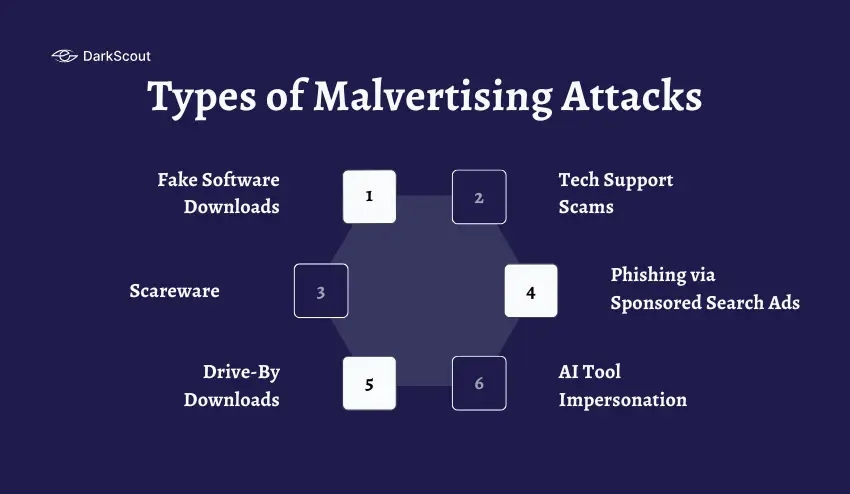
It’s important to understand that malvertising comes in various forms, all working to deceive users in different ways.
1. Fake Software Downloads
This usually involves malicious ads claiming to be downloads for popular apps such as browsers, productivity tools, or security software, which will redirect users to spoof download pages. The download will install malware when executed.
2. Tech Support Scams
These types of ads display a large warning about their device or account being compromised, telling the user to call a fake tech support number or give their device remote control access. In reality, these scams look to either steal information or deliver malware.
3. Scareware
These work very much like the tech support scams; however, they are far more aggressive. They will often display warnings stating the device has a virus or is at critical risk, which tricks users into downloading fake anti-virus software that is, in reality, malware itself.
4. Phishing via Sponsored Search Ads
This works by purchasing paid ads on Google/Bing when users search for terms like “Microsoft login,” “PayPal sign in,” or work-specific programs. When the user clicks on the top result (a fake ad), they are led to a spoof login page.
5. Drive-By Downloads
These are by far the most dangerous and passive attacks. These are loaded when a user enters a website, and download and run code without the need for any interaction with the user (usually exploiting browser security flaws).
6. AI Tool Impersonation (Emerging Threat)
A new trend in 2025 has been an increase in ads impersonating AI tools such as image generators, video editors, or AI assistance systems. When people look for these tools, they will click the ad that is being disguised as the correct tool and deliver credential theft malware.
Real Malvertising Examples from 2025–2026
These are not theoretical risks. Malvertising hit millions of real devices in the past year alone.
1. Microsoft’s One-Million-Device Campaign (2025)
Microsoft Threat Intelligence unearthed a mass malvertising operation compromising nearly one million machines globally. Attackers infected millions of machines by serving ads on illegal streaming sites that led users to malware hosted on GitHub. No click necessary. Storm-0408, the tracked threat actor, embedded malvertising redirectors into the video content displayed on these sites.
2. The Kling AI Facebook Campaign (2025)
Attackers hijacked and created Facebook pages impersonating Kling AI, a popular AI image and video tool with millions of users. They ran paid ad campaigns offering free AI-generated media. Users who clicked were directed to a fake site where they downloaded a ZIP file containing a malicious executable disguised as a media file. The malware then stole passwords, crypto wallet credentials, and keystrokes.
3. Luma Dream Machine Ads (2025)
Mandiant reported that the threat group UNC6032 ran a campaign impersonating AI video tools like Luma AI’s Dream Machine. Fake download buttons delivered malware that used in-memory execution techniques to minimize forensic traces.
4. WinSCP, PuTTY, and OBS Studio Spoofs (2024–2025)
Attackers created ads in Google search that impersonate popular software downloads like WinSCP, PuTTY, and OBS Studio. Victims who fell for the ads landing on fake sites downloaded ransomware and info-stealers such as RedLine and IcedID.
5. The Lowe’s Employee Portal Scam
Attackers placed a fraudulent ad on Google Search that impersonated Lowe’s internal HR portal. Employees looking to log in to the company intranet simply saw and clicked a fake ad and entered credentials on a site they believed to be legitimate. The information was then harvested by attackers.
The commonality between these examples is that attackers have exploited familiar platforms like Google Ads, Facebook, and standard ad networks, leading victims to believe they have absolutely no reason to be suspicious.
How to Prevent Malvertising: For Individuals
Most malvertising attacks succeed because users are not prepared for them. These steps close the most common gaps.
1. Use an Ad Blocker
This is the single most effective weapon you can deploy against malvertising. When a web page is loading, your ad blocker will prevent the vast majority of ads from loading-including malicious ones. If an ad never loads, malware never gets downloaded.
Use reputable ad blockers such as AdBlock Plus, or uBlock Origin, and make sure your filter lists are kept up to date. While ad blockers aren’t 100% effective (malvertising does get past them, particularly on pages you have whitelisted), they will block 99% of threats.
2. Keep Every Piece of Software Updated
Malvertising attacks exploit vulnerabilities in unpatched software. “Drive-by downloads” in particular commonly target vulnerable browsers, plugins, Java, Adobe Reader, and the operating system.
Make sure your browser, OS, and applications are updated immediately whenever updates are released. Enable automatic updates when you can. Uninstall unneeded plugins: every inactive plugin is a potential attack vector.
3. Remove or Disable Unused Browser Plugins
Flash and Java are probably the most exploited targets in malvertising campaigns and, if you have either of them still installed, they need to be removed. If a plugin is required, ensure that you can have your browser ask for permission before loading, rather than letting plugins automatically run on a page.
4. Enable Click-to-Play for Browser Plugins
This setting forces your browser to ask before running any plugin on a page. It prevents plugins from executing automatically, which is exactly how drive-by downloads work. Enable this in your browser’s advanced or security settings.
5. Be Skeptical of Every Ad You See
Healthy skepticism goes a long way. Before clicking any sponsored result or ad, check the destination URL carefully. Legitimate companies almost never ask you to download software through an advertisement.
Be especially suspicious of:
- Urgent security warnings that appear in ads
- Offers that seem too good to be true
- Fake “update required” prompts from an ad
- Pop-ups that cannot be dismissed normally
6. Never Download Software from an Ad
If you’re trying to download a piece of software, type in the official URL into your address bar or open a bookmark. Don’t click an ad to download it, even if that ad is the very first result in Google search.
7. Clear Your Browser Cache Regularly
Malvertising can plant scripts or cookies in your browser cache that persist even after you leave the infected page. Clearing your cache periodically removes residual threats and reduces the risk of re-infection.
8. Use a DNS Filtering Service
DNS filtering blocks your computer from even connecting to malicious websites, including the sites that serve malvertising. Consider using Cloudflare’s 1.1.1.1 (which has a malware filtering option) or Quad9 for an additional layer of defense.
9. Monitor Whether Your Credentials Have Been Stolen
If malvertising successfully delivers a stealer to your device, your saved passwords and session cookies are at risk. Regularly check whether your email or credentials have appeared in breach databases.
You can run a free email scan on DarkScout to check instantly. If your credentials have been stolen, change affected passwords immediately and enable two-factor authentication on all accounts.
How to Prevent Malvertising: For Businesses
Individual defences are not enough for organizations. Businesses face additional exposure, a single employee clicking a malicious ad can result in a full network breach.
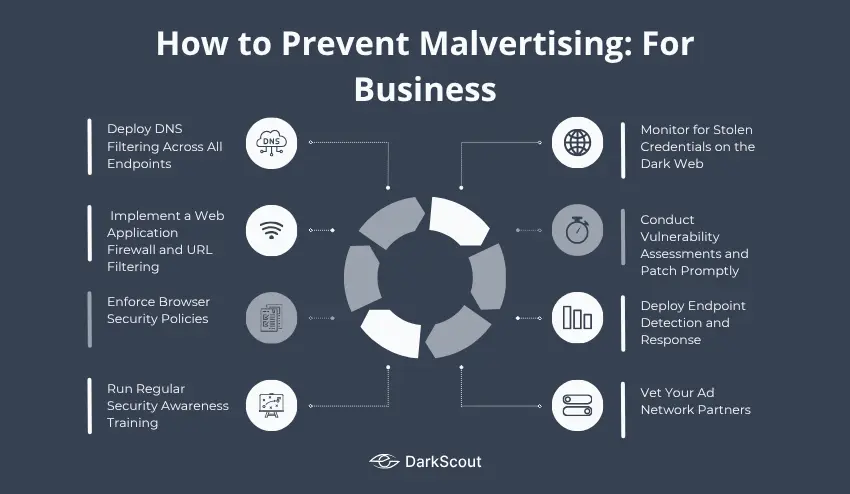
1. Deploy DNS Filtering Across All Endpoints
This DNS filtering will prevent employees from reaching domains of malicious intent, on whatever device or browser they use. It is a primary defense suggested by CISA to government agencies for malvertising prevention, and it applies equally well to all businesses.
This is particularly important for remote and hybrid workers accessing the internet on home networks, where company policy may not be applied to the browser’s security features.
2. Implement a Web Application Firewall and URL Filtering
URL filtering blocks access to categories of sites that are high-risk vectors for malvertising, piracy sites, adult content platforms, newly registered domains, and known malicious ad networks. Pair this with a web application firewall (WAF) that can inspect traffic in real time.
3. Enforce Browser Security Policies
Limit employee browser use by forcing group policies or mobile device management settings. This is inclusive of; the disabling of all auto-execution of plugins; stopping unknown file downloads; setting the secure browsing setting to its maximum capacity; and disallowing unknown browser extension downloads.
4. Run Regular Security Awareness Training
Employees are a primary target. Training should cover how to recognize malvertising lures, including fake software update prompts, scareware alerts, and sponsored search ads that impersonate internal tools.
Include real examples from recent campaigns. The Lowe’s employee portal scam is a compelling example: the employees were not doing anything suspicious. They were just searching for their company’s login page.
5. Monitor for Stolen Credentials on the Dark Web
When malvertising succeeds, and a stealer is deployed, the stolen credentials often end up for sale on dark web markets within hours. The window between credential theft and account takeover can be very short.
Continuous dark web monitoring alerts your security team the moment compromised employee credentials surface, giving you time to reset passwords and lock accounts before attackers use them.
This is where DarkScout’s platform provides direct value. It monitors dark web markets, forums, and breach databases for your organization’s domains and credentials around the clock.
6. Conduct Vulnerability Assessments and Patch Promptly
Malvertising exploits what is already broken. Outdated software with known vulnerabilities is the primary target for drive-by downloads. Regular vulnerability assessments identify unpatched systems before attackers can exploit them.
Map your attack surface continuously. Every internet-facing asset with a missing patch is a potential entry point, not just for malvertising, but for every category of attack that follows.
7. Deploy Endpoint Detection and Response (EDR)
Many malware attacks contain fileless malware. Signature-based Antivirus will fail to catch fileless malware. EDR tools can detect behavioral anomalies that might go unnoticed by antivirus software.
EDR should ideally provide real-time detection and response to a breach, and preferably be able to contain the infected machine automatically.
8. Vet Your Ad Network Partners (For Publishers)
If your organization runs advertising on your own website, your ad network choices directly affect your users’ safety. Carefully evaluate ad partners and prioritize those with robust content vetting and transparent policies. Review campaign performance reports regularly for anomalies that could indicate malvertising has been inserted into your inventory.
One malvertising incident served through your site can permanently damage your brand’s reputation with users, even if your organization did nothing wrong.
What Happens After a Malvertising Attack?
Understanding the downstream consequences helps organizations respond faster and more effectively.
When malware is successfully installed, the immediate risks include credential theft, session hijacking, and reconnaissance of the infected system. But the damage rarely stops there.
Stolen credentials flow to dark web markets, often within hours. Stealer logs containing passwords, session cookies, and browser-saved data are packaged and sold in bulk. From there, attackers use them for credential stuffing, account takeovers, and in some cases, full network compromise.
Ransomware deployments frequently start with a malvertising infection. According to 2025 data, 91% of cyber insurance losses in the first half of the year were tied to ransomware attacks, many initiated through malvertising.
The moment you suspect a malware infection, execute your data breach response plan. Isolate the affected endpoint, reset all credentials that may have been exposed, notify your security team, and begin monitoring for signs that stolen data is being used.
Final Thoughts
Malvertising is no longer a niche threat. It is currently the most common initial access vector for malware, responsible for attacks that have compromised millions of devices in a single campaign.
The good news is that it is preventable with the right layers in place: ad blockers, updated software, DNS filtering, employee training, and continuous credential monitoring to catch the damage when something slips through.
The combination of prevention and detection is what matters. You cannot rely on one without the other.
Start monitoring your exposure for free on DarkScout →