Enterprise cloud security is one of those terms that gets thrown around in boardrooms and RFPs, but what does it actually mean?
Here’s the simple version. Enterprise cloud security is how large organizations protect their data, applications, and infrastructure when they’re running in cloud environments like AWS, Microsoft Azure, or Google Cloud. It’s different from regular cloud security because enterprises have more complexity, thousands of users, multiple departments, strict compliance requirements, legacy systems connecting to the cloud, and security teams that need visibility across everything.
Most small businesses can get away with basic cloud security controls. Enterprises can’t. The stakes are too high, the attack surface is too large, and the compliance penalties are too severe.
Let me walk you through what enterprise cloud security actually involves, why it’s harder than it looks, and what you need to do to get it right.
What Makes Enterprise Cloud Security Different?
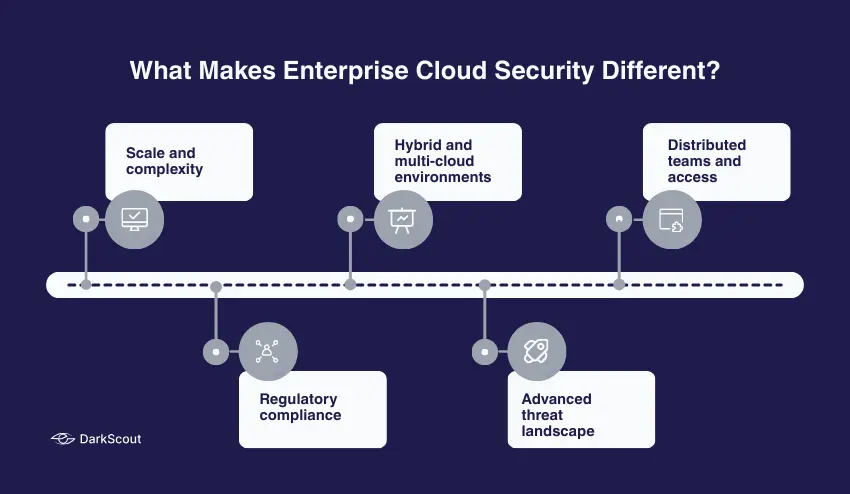
Enterprise cloud security is not cloud security on a larger scale. It is also fundamentally different due to the way enterprises work.
1. Scale and complexity
Businesses operate hundreds or thousands of cloud workloads in multiple regions, accounts, and providers. The resources are spun up by development teams. Shadow IT is a reality, whether you like it or not. Simply keeping the right inventory of what is running is a full-time job.
2. Regulatory compliance
Businesses are guided by such frameworks such as HIPAA, PCI-DSS, SOC 2, ISO 27001, GDPR, and industry-related regulations. The enterprise cloud security must implement these demands on all workloads, all environments, all regions. A single poorly configured resource would result in a multimillion-dollar compliance breach.
3. Hybrid and multi-cloud environments
The majority of businesses do not operate in the cloud. They have on-premise data centers, private clouds, various public cloud providers and SaaS applications all linked together. Enterprise cloud security must operate throughout all of it and have uniform policies and visibility.
4. Advanced threat landscape
Advanced persistent threats, organized crime, and nation-states attack enterprises. These are not automated bot attacks. These are organized campaigns that are specifically meant to target your organization. Enterprise cloud security must be able to identify and act on threats that are not identified or acted upon by simple tools.
5. Distributed teams and access
Cloud resources must be available to thousands of employees, contractors, partners, and automated systems. Dealing with identity, permissions, and access control on an enterprise scale is many times more complicated than dealing with ten individuals.
That is why cloud security in the enterprise needs specific platforms, special teams, and considerable investment. You cannot simply turn on the default settings and hope that everything will be all right.
Core Components of Enterprise Cloud Security
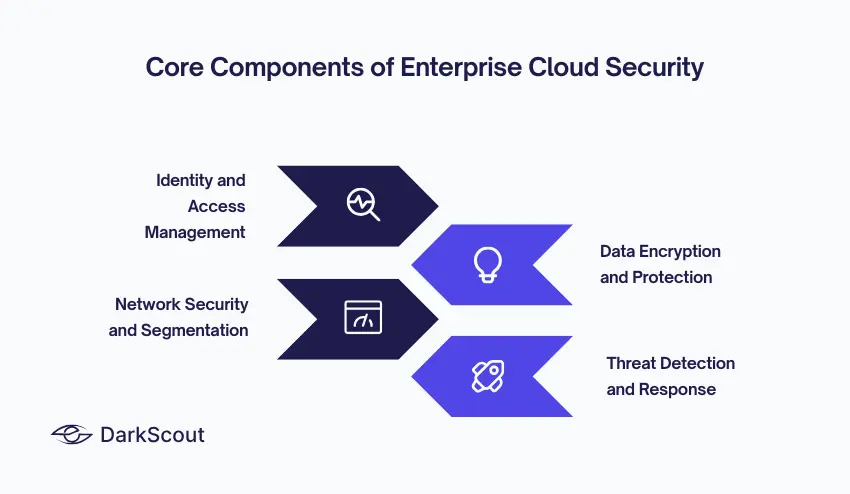
Enterprise cloud security isn’t one thing. It’s a combination of technologies, processes, and controls working together. Here are the core components.
1. Identity and Access Management (IAM)
IAM is the foundation of enterprise cloud security. In the cloud, identity is your perimeter. If an attacker gets valid credentials, they’re in.
At enterprise scale, IAM means managing thousands of user accounts, service accounts, API keys, and permissions across multiple cloud platforms. You need single sign-on (SSO), multi-factor authentication (MFA) everywhere, privileged access management (PAM) for admin accounts, and continuous monitoring of who’s accessing what.
The principle of least privilege is critical. Nobody gets more access than they need to do their job. That contractor who left three months ago? Their access should have been revoked immediately. That service account with admin rights? It probably only needs read access to three specific resources.
Weak passwords remain one of the easiest ways for attackers to compromise enterprise cloud environments. Use online password generators to create strong, unique passwords for every admin and service account.
2. Data Encryption and Protection
Data encryption is non-negotiable in enterprise cloud security. Everything gets encrypted: data at rest, data in transit, data in backups, data in logs.
Cloud providers offer encryption services (AWS KMS, Azure Key Vault, Google Cloud KMS), but enterprises need centralized key management policies. Keys can’t live in the same place as the data they protect. Key rotation needs to happen on schedule. Access to keys needs strict auditing.
Beyond encryption, data loss prevention (DLP) tools scan for sensitive data being stored or transmitted improperly. Tokenization and masking protect production data in non-production environments. Database activity monitoring tracks who’s querying what and when.
3. Network Security and Segmentation
Enterprise cloud security requires proper network architecture. You can’t put everything in one flat network and hope firewalls at the edge protect you.
Use virtual private clouds (VPCs), subnets, and security groups to segment workloads. Production should be completely isolated from development. Customer data should be isolated from internal tools. Different applications should be isolated from each other.
Web application firewalls (WAFs), distributed denial of service (DDoS) protection, and intrusion detection systems (IDS) add additional layers. But segmentation is the foundation. If an attacker compromises one part of your environment, segmentation limits lateral movement.
This applies across environments, too. If you’re running hybrid cloud security with both public and private clouds, make sure there’s proper segmentation and controlled connectivity between them.
4. Threat Detection and Response
Enterprise cloud security needs continuous monitoring and threat detection. Traditional security tools built for on-premise environments don’t work in the cloud.
Cloud-native security platforms provide:
- Security Information and Event Management (SIEM) — aggregates logs from all cloud services and analyzes them for threats
- Cloud Security Posture Management (CSPM) — continuously scans cloud configurations for misconfigurations and policy violations
- Cloud Workload Protection Platforms (CWPP) — monitors workloads (VMs, containers, serverless functions) for vulnerabilities and threats
Learn more about cloud workload protection and how it fits into your overall strategy.
Common Enterprise Cloud Security Threats
Understanding enterprise cloud security means understanding what you’re defending against. Here are the threats enterprises actually face.
1. Misconfigured Cloud Resources
This is still the number one cause of cloud data breaches in enterprises. Someone checks the wrong box, an S3 bucket becomes public, and customer data is exposed.
The scale makes it worse. When you have hundreds of developers deploying thousands of resources across multiple accounts and regions, misconfigurations are inevitable. Enterprise cloud security needs automated scanning that catches them before they become breaches.
Similar to common website vulnerabilities, cloud misconfigurations are often simple mistakes that have massive consequences.
2. Compromised Credentials
Stolen usernames and passwords remain the most common way attackers gain initial access to enterprise cloud environments.
Credentials get compromised through phishing, password reuse, malware, and data breaches. Once attackers have valid credentials, they look like legitimate users. Enterprise cloud security needs to detect anomalous behavior even when the credentials themselves are valid.
Check if your organization’s credentials have been exposed with DarkScout’s email breach checker. Knowing what’s already compromised is the first step.
3. Insider Threats
Not all threats are external. Disgruntled employees, careless contractors, and compromised insider accounts cause significant damage.
Enterprise cloud security needs to monitor privileged user activity, detect data exfiltration attempts, and enforce separation of duties so no single person can cause catastrophic damage alone.
4. API Vulnerabilities
Everything in enterprise cloud environments is managed through APIs. If those APIs aren’t properly secured, attackers can use them to create resources, escalate privileges, and exfiltrate data.
API keys exposed in code repositories, weak authentication, lack of rate limiting, and insufficient logging all create vulnerabilities that attackers actively exploit.
5. Supply Chain Attacks
Enterprises use third-party services, open source libraries, and vendor software throughout their cloud environments. Compromise one vendor, compromise their customers.
Enterprise cloud security requires vendor risk management, software composition analysis, and continuous monitoring of third-party dependencies.
Enterprise Cloud Security Best Practices
There are best practices that must be adhered to in order to secure enterprise cloud environments at scale.
- Implement zero trust architecture- Never trust, always verify. All access requests are authenticated and authorized irrespective of the source. Learn more about zero trust architecture and how it applies to cloud environments.
- Automate security controls- Manual processes don’t scale. Enforce security requirements through infrastructure-as-code, policy-as-code, and automated compliance scanning.
- Maintain complete visibility- You cannot take what you do not see. Keep proper records on all cloud resources in all accounts, regions and provider. Keep a constant check of changes.
- Enable comprehensive logging- Record all of it API calls, access attempts, configuration changes, network traffic. Ship logs into centralized systems where you can analyze them and configure alerting on suspicious activity.
- Practice defense in depth- Don’t rely on one security control. Layer multiple controls so if one fails, others still provide protection. For more on layered security, check out our guide on cloud security monitoring.
- Conduct regular security assessments- Red team exercises, penetration tests and tabletop exercises find the gaps before attackers.
- Plan for incident response- Breaches will happen. Prepared written guidelines on how to detect, contain and recover security incidents.
- Train your teams- Enterprise cloud security has a role in developers, DevOps engineers, and IT staff. Security awareness training must be ongoing and not an annual checkbox compliance training.
Choosing Enterprise Cloud Security Solutions
The enterprise cloud security market is crowded. Here’s what to look for.
- Cloud-native architecture – Tools built for on-premise environments don’t translate well to the cloud. Choose solutions designed specifically for cloud environments.
- Multi-cloud support – If you run AWS, Azure, and Google Cloud, your security platform needs to work across all three with consistent policies and unified visibility.
- Integration with existing tools – Your enterprise cloud security platform needs to integrate with your SIEM, SOAR, ticketing systems, and communication tools. Siloed tools create blind spots.
- Scalability – Solutions that work for 100 resources may not work for 10,000. Test at scale before committing.
Compliance automation. Built-in compliance frameworks and automated reporting save enormous amounts of time during audits.
Bottom Line
Enterprise cloud security isn’t something you set up once and forget. It’s continuous work that requires dedicated teams, specialized tools, and constant vigilance.
The enterprises that get it right treat security as a shared responsibility across development, operations, and security teams. They automate wherever possible. They maintain comprehensive visibility. They practice defense in depth. And they prepare for incidents before they happen.
The enterprises that get breached? They treat enterprise cloud security as an afterthought, rely on default configurations, and assume their cloud provider handles everything.
Don’t make that mistake. Enterprise cloud security is your responsibility, and it starts with understanding what you’re actually protecting and who’s trying to take it from you.