People use “IP lookup” and “IP reputation check” interchangeably. They’re not the same thing.
They answer completely different questions. They pull from different data sources. They’re useful in different situations. And using one when you actually need the other means you’re missing the information that matters.
If you’ve ever wondered why an IP lookup told you an address is in Frankfurt, Germany, but didn’t tell you whether it’s sending spam, that’s the distinction in practice. Location is factual data. Reputation is behavioral history. Both are about an IP address. Neither tells you what the other tells you.
This guide explains exactly what each one is, what it returns, when to use each, and why understanding the difference makes you significantly better at investigating suspicious traffic, troubleshooting email issues, and making security decisions.
What Is an IP Lookup?
An IP lookup retrieves factual, descriptive information about an IP address.
It answers the question: What is this IP address?
Think of it like looking up a phone number in a directory. The directory tells you who registered that number, what area it’s from, what carrier it belongs to. It doesn’t tell you whether that person has been making nuisance calls.
A standard IP lookup returns:
Geolocation data: This is your typical country, region, city, and approximate GPS coordinates that are linked to the IP address. The databases used for these lookups associate IP address blocks with physical addresses based on registration information and network routing data. Keep in mind, it’s not going to be super precise, expect it to tell you a city, but street-level precision is generally not attainable.
ASN (Autonomous System Number): The ASN refers to the organization that is responsible for managing the block of IPs to which this specific IP address belongs. Think of it this way: the entire internet’s IP addresses are allocated and routed through “Autonomous Systems.” An ASN lookup will tell you if this IP is owned by a cloud service like Amazon Web Services, an ISP like Comcast, a university network, or a mobile carrier.
ISP and organization: This refers to the internet service provider or organization that is affiliated with that ASN. So this data will tell you if it’s from a data center provider (like AWS, Google Cloud, Azure, DigitalOcean), a company, a residential ISP, or a mobile provider.
Connection type: Whether the address is categorized as residential, corporate, data center, mobile, or satellite. This classification matters for security decisions because the type of network an IP belongs to is a strong signal about what kind of traffic typically originates from it.
Hostname: Reverse DNS resolves to an IP address; it shows here. So, in my example of seeing mail-wy2-f47.google.com, now you instantly know that this is most probably a Google mail server.
Network range: It displays the IP CIDR or subnet to which the IP address belongs, that is to say, how big a chunk of IPs it belongs to, which can all belong to the same person or entity.
What the IP lookup does NOT tell you is if the IP has done something malicious; that is a different issue altogether.
What Is an IP Reputation Check?
An IP reputation check helps us determine the reliability and behavior of an IP address.
It is the equivalent of: “Have I heard anything about this IP before, and can I trust them?”
If an IP lookup is like a phone book lookup to know who the owner of the number is, then the reputation check is like getting a printout of their phone bill history and knowing how many times they’ve been marked as spammers.
A reputation check checks various databases, threat intelligence feeds, and reports abuse data, and gives us an IP’s historical data:
- Blacklist status: Is the IP found on one of the following blocklists: DNSBLs (DNS-based blacklists), Spam blocklists (e.g. Spamhaus, Barracuda), or Security blocklists (e.g., from threat intelligence companies). If an IP address is found in one of the above blacklists, this means that the IP address has been caught spamming/doing something malicious that the provider deemed bad enough to put the IP in their database of blacklisted IP addresses.
- Abuse report history: That’s the quantity of reports of the IP being used in abusive ways (as gathered by networks, hosting providers, and researchers in online communities like AbuseIPDB), and when those reports came in. These may range from brute-force scanning to spam and beyond.
- Risk or fraud score: This is often a quantitative (0–100, lower can be safer or higher risk) or categorical (Low, Medium, High) aggregate of all other metrics into a single indicator of risk or likelihood of fraud. Every provider uses a slightly different system.
- Proxy, VPN, and Tor detection: Security/fraud prevention services will look for connections through these types of anonymizing systems and flag them with higher suspicion, given the fact that they tend to be used for actions people wish to hide.
- Spam activity signals: Any indications that the IP was part of sending out spam campaigns (including email spam trap hits or high complaint rates with mail providers) will be factored in.
- Malware and botnet associations: Is this IP known for being part of a botnet, a command and control (C2) infrastructure, or for delivering malware?
- Recency weighting: This is the idea that negative behavior that happened just a moment ago is more concerning than something from years back. The ‘trust score’ decays over time for good systems. An IP could have been spamming two years ago, and if it’s behaved for the last two years, it should have a higher score than one that spammed yesterday.
What Each One Returns: Side by Side
| Data Point | IP Lookup | IP Reputation Check |
|---|---|---|
| Country and city | ✅ Yes | Sometimes (as context) |
| ISP and organization | ✅ Yes | Sometimes (as context) |
| ASN and network type | ✅ Yes | Sometimes (as context) |
| Hostname (reverse DNS) | ✅ Yes | ❌ No |
| Network range | ✅ Yes | ❌ No |
| Blacklist appearances | ❌ No | ✅ Yes |
| Abuse report count and history | ❌ No | ✅ Yes |
| Risk or fraud score | ❌ No | ✅ Yes |
| VPN / proxy / Tor detection | Sometimes | ✅ Yes |
| Spam activity signals | ❌ No | ✅ Yes |
| Malware/botnet associations | ❌ No | ✅ Yes |
| Recency of last abuse | ❌ No | ✅ Yes |
The tools that provide the best value in 2026 combine both types of data in a single lookup. DarkScout’s free IP reputation checker returns geolocation, ASN, network type, blacklist status, abuse signals, VPN and Tor detection, and a risk score in a single result, so you get the full picture without running two separate checks.
When to Use an IP Lookup
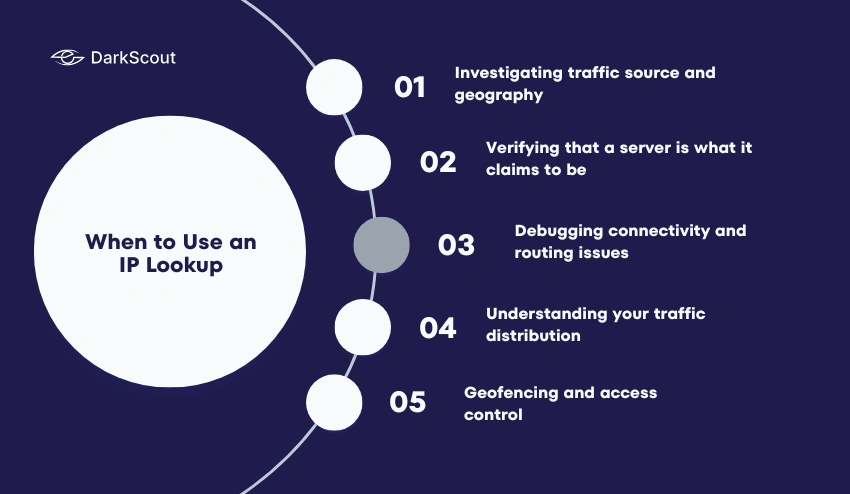
1. Investigating traffic source and geography
When you see an unfamiliar IP in your server access logs, firewall logs, or authentication records and want to understand where it’s coming from and what kind of network it belongs to. Knowing that a login attempt came from a residential ISP in your home country feels different from knowing it came from a data center in a country you don’t operate in.
2. Verifying that a server is what it claims to be
You receive an email from what claims to be a Google or Microsoft mail server. An IP lookup on the sending address tells you whether the IP actually belongs to Google or Microsoft’s ASN, or whether it’s coming from a completely unrelated provider despite the name in the header. This is a basic authentication verification step that many email administrators perform routinely.
3. Debugging connectivity and routing issues
When troubleshooting network problems, IP lookup data tells you about the routing path, the organization responsible for the address, and whether you’re reaching the server you expect. The ASN data is particularly useful for identifying which network is responsible for a problem.
4. Understanding your traffic distribution
Services like security monitoring and analytics use IP lookup data to map the origin of your visitors, tell you how they’re connecting (mobile, home, office, etc.), and track changes in your traffic over time.
5. Geofencing and access control
When you want to control which locations are allowed to access your services, restrict traffic to areas where you provide services, or define access controls based on location, IP geolocation from IP lookup services is key.
When to Use an IP Reputation Check
1. Troubleshooting email deliverability
Your emails are landing in spam folders or being rejected by receiving servers. An IP reputation check on your sending IP addresses tells you whether any of them are blacklisted, have accumulated abuse reports, or have scores that suggest a poor sender reputation. This is the first diagnostic step for any email deliverability investigation.
For organizations relying on email for business communication, email security encompasses IP reputation as a foundational layer alongside authentication and content filtering.
2. Evaluating incoming security alerts
A firewall alert, failed authentication attempt, or suspicious API call comes from an IP you don’t recognize. An IP reputation check tells you immediately whether that address has a history of abuse, is associated with known attack infrastructure, or is a clean address that might warrant a different level of investigation.
3. Fraud prevention and access control decisions
Before allowing a registration, payment, or other sensitive action, a reputation check on the visitor’s IP helps identify connections coming from high-risk sources: known fraud networks, Tor exit nodes, or addresses with recent abuse histories. A poor reputation doesn’t automatically mean blocking, but it should influence how much additional verification you require.
4. Investigating whether your own IP has been compromised
If your server’s behavior is unusual, or if you’re receiving abuse complaints about traffic originating from your IP, a reputation check shows you what others are seeing: whether your IP has accumulated abuse reports, whether it’s appeared on blacklists, and how your reputation score compares to what it should be for a clean server.
5. Assessing new IP addresses before configuring them
Before setting up a new server IP for email sending or hosting sensitive services, check its existing reputation. An address inherited from a previous user who sent spam carries that history into your hands. Discovering a poor reputation before configuring the address saves you from troubleshooting problems that aren’t your fault.
When You Need Both IP Lookup and IP Reputation Check
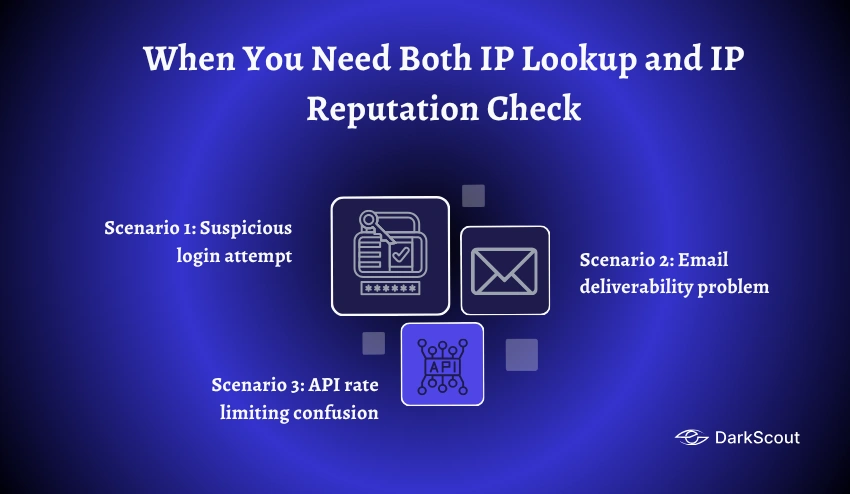
Most real security and deliverability investigations benefit from running both checks together. Here’s how they complement each other:
Scenario 1: Suspicious login attempt
You see a login attempt from an unfamiliar IP. An IP lookup tells you it’s from a data center ASN in a country you don’t operate in, and that it’s categorized as a hosting provider rather than a residential ISP. A reputation check tells you the address has 47 abuse reports in the last 30 days for brute-force scanning activity. Together: high-confidence malicious actor. Block it and investigate whether any other activity from that ASN warrants broader action.
The IP lookup alone would tell you the address is a data center abroad, which is interesting but not conclusive. The reputation check alone would tell you it has a bad history, but not that it’s a data center rather than a compromised residential device, which affects how you categorize and respond to the threat.
Scenario 2: Email deliverability problem
The transactional email deliverability issue you’re seeing is with one specific mail provider. When you perform an IP lookup against the sending IP, you see that the IP belongs to the ASN of your ESP and has been classified as a mail infrastructure IP, so that’s okay! When you check the reputation of that IP, you discover it’s on a mid-level spam blocklist and it has a sender score lower than average.
The IP lookup alone tells you the address is yours and configured correctly. The reputation check tells you why mail is still being filtered despite the correct setup.
Scenario 3: API rate limiting confusion
Your application is being unexpectedly rate-limited by a third-party API provider. An IP lookup shows your outgoing requests come from a cloud server ASN (AWS, in this case). A reputation check shows the IP has a below-average risk score with VPN-like characteristics flagged. The rate limiting isn’t random: your server’s ASN and reputation profile are triggering more aggressive rate limits than the API provider applies to residential or corporate network traffic.
Understanding your external attack surface management requires knowing how your infrastructure looks to outside systems, and the combination of IP lookup and reputation data gives you that external perspective directly.
Why People Confuse Them
The confusion is understandable. Several things push people toward treating these as the same:
1. The tools look similar
Both take an IP address as input and return information about it. The interface for running them is identical. The output appears in a similar format. If you’ve only ever used one type of tool, you might assume that’s what “IP lookup” means in both directions.
2. Some tools do both
Good IP investigation tools return geolocation data alongside reputation signals. When a tool returns a country, ASN, risk score, and blacklist status all in one response, it’s not obvious that these are two conceptually distinct types of information pulled from different underlying sources. The single interface hides the distinction.
3. The terminology is inconsistent
Different tools call the same thing different names. “IP lookup,” “IP check,” “IP intelligence,” “IP analysis,” and “IP reputation” are all used somewhat interchangeably by different vendors, even when the tools they describe do meaningfully different things.
4. The questions often overlap
“Should I trust this IP address?” is a question that benefits from both geolocation context (is it from an unusual location?) and reputation data (has it been flagged for abuse?). Because both inform the same ultimate decision, it’s easy to think of them as one unified question with one unified answer.
What Neither One Tells You
Understanding the limits of both types of checks prevents overconfidence in their results.
Neither tells you the person behind the IP
IP addresses identify network endpoints, not individuals. A residential IP address is typically assigned dynamically by an ISP and changes regularly. Even a static IP address tells you about the organization that controls the address, not the individual using it at a specific moment.
Neither guarantees safety
A clean IP lookup result tells you the address is a residential ISP in a familiar country. That doesn’t mean the traffic is legitimate. Residential IP addresses are the most trusted category precisely because they’re the most commonly used by fraud operations that specifically choose them to avoid detection.
A clean reputation check tells you the address has no current blacklist appearances and a good abuse report history. That tells you about past behavior, not current intent. A freshly acquired clean IP used for the first time in an attack has no bad history yet.
Neither reveals dark web signals
Stealer logs sold on dark web markets often include credentials associated with specific IP ranges. Botnet infection databases track which IPs are compromised endpoints. These underground intelligence signals aren’t reflected in standard IP lookup or reputation databases.
This is the intelligence gap that how dark web monitoring works explains in detail: the difference between what surface-facing tools see and what’s visible in the underground channels where compromise signals first appear. A fuller picture of IP-level security risk includes this underground intelligence layer alongside the lookup and reputation data.
Both have data quality limitations
Geolocation data is an approximation and can be wrong. VPN users, Tor users, and many corporate networks will show locations that don’t match where the actual user is. Reputation data is only as current as the last database update and only as comprehensive as the sources being queried.
How to Run Both Efficiently
For most purposes, the most efficient approach is a single tool that returns both types of information in one lookup.
DarkScout’s free IP reputation checker does exactly this: enter any IPv4 or IPv6 address and get geolocation, ASN details, network type classification, blacklist status across major databases, abuse report signals, VPN and Tor detection, and a risk score in one result. No account required.
For situations where you need to go deeper on specific aspects:
For email deliverability specifically: Run your sending IP through Google Postmaster Tools (for Gmail sender reputation), Microsoft SNDS (for Outlook), and MXToolbox’s blacklist checker (for a broad view across 100+ blacklists). These tools go beyond general reputation to provide mail-provider-specific visibility.
For geolocation depth: ipinfo.io or MaxMind can give you a whole bunch of details on the user, including ASN, connection type, privacy detection, etc. Useful if the accuracy of your geolocation is paramount or if developing an app that depends on structured data.
When enriching signals in security ops: Your SIEM (or security platform) integrates threat intelligence most efficiently at scale, needing to automatically dial reputation databases for every IP appearing in your logs rather than forcing analysts to look them up manually.
For a thorough understanding of how reputation scores are calculated, what factors affect them most, and how to fix a poor score, the IP reputation guide covers the full picture.
Conclusion
IP lookup and IP reputation check are not two names for the same thing. They’re two different questions about the same identifier.
An IP lookup answers: what is this address? Where is it? Who controls it? What type of network is it on?
An IP reputation check answers: what has this address done? Is it trustworthy? Has it been flagged for abuse? Does it have a history of malicious behavior?
Most practical security and deliverability questions benefit from both answers together. Knowing an address is from a data center in Eastern Europe is interesting context. Knowing it also has 200 abuse reports for brute-force scanning in the past week makes it actionable.
The good news is that running both doesn’t require two separate tools or two separate workflows. DarkScout’s free IP reputation checker returns the complete picture for any IPv4 or IPv6 address in seconds: geolocation and network context alongside blacklist status, abuse signals, proxy detection, and a risk score. No account, no setup, no cost.