Network security is now more important than ever before in today’s digital world. Firewalls are considered the initial line of defense, which safeguards the systems against unauthorized access, malware, and other cyber threats.
There are many types of firewall available, each designed for different purposes and network environments. Understanding these types of firewall helps individuals and organizations choose the right solution for their security needs.
This guide will break down all major types of firewall, explain how they work, highlight their pros and cons, and provide practical examples. At the conclusion, you will have a clear guide as to how to choose the appropriate firewall to use on your network.
What is a Firewall?
A firewall is a network security device or software that is used to guarantee the monitoring and control of the network traffic that is flowing in and out of the network based on the set of security rules that have been predetermined. Essentially, it offers a barrier between an internal network that is secure and external networks that are insecure like the internet.
Firewalls protect the networks by:
- Blocking out unauthorized access: It is to stop hackers or malware from accessing your systems.
- Blocking traffic: Legitimate data packets only are to be passed.
- Monitoring activity: Keeping logs to determine suspicious activity or violations.
In conclusion, a firewall is an extremely significant part of any cybersecurity strategy because it stores secured sensitive data and network resources.
You May Also Like: 6 Best GlobalProtect Alternatives for 2026
Types of Firewalls
Firewalls may be classified according to their functionality and technology. Knowledge of such types will enable you to select the most appropriate solution to your network.
Based on Functionality / Technology
- Packet Filtering Firewall
- How it works: Scans individual packets of data and blocks or permits them according to pre-set rules, including IP address, port, or protocol.
- Advantages: Rapid and easy; few effects on the network performance.
- Cons: low level of security; inability to scan payload or identify sophisticated threats.
- Application Cases: Simple filtering or small networks.
- Stateful Inspection Firewall
- How it Works: Monitors the condition of active connections and identifies if packets belong to a legitimate session.
- Advantages: It is safer than packet filtering; it blocks some forms of attacks.
- Cons: Slightly slow because of connection tracking.
- Use Cases: Medium to large networks that need superior security but are not complex to set up.
- Proxy Firewall
- How it Works: It acts as a mediator between the user and the network; all the traffic runs over the proxy.
- Advantages: Hides internal addresses; is capable of filtering application-layer traffic.
- Disadvantages: Slower; More difficult to set up.
- Use Cases: Organizations that require high privacy and application level filtering.
- Next-Generation Firewall (NGFW)
- How it Works: It combines the conventional firewall functions with enhanced functions such as deep packet inspection, intrusion prevention and application awareness.
- Advantages: All-inclusive security; defends against contemporary threats.
- Disadvantages: It is more expensive; it must be administered by skilled personnel.
- Applications: Business and highly secured networks.
- Web Application Firewall (WAF)
- How it works: Defends web applications by filtering and monitoring HTTP traffic between a web application and the internet.
- Advantages: Protection against such attacks as SQL injection and cross-site scripting (XSS).
- Cons: Protects web applications and not networks.
- Use Cases: SaaS providers, e-commerce platforms, and websites.
Based on Deployment / Location
Firewalls may also be grouped by the place of deployment and mode of deployment in a network. The appropriate type of deployment will be determined by the size of your network, architecture and security needs.
- Hardware Firewall
- How it functions: It is a physical gadget that is placed between your internal network and the internet.
- Advantages: High performance; exclusive resources; safeguards complete networks.
- Disadvantages: It can be costly; it needs maintenance and set up.
- Use Cases: Organizations, data centers and enterprises that have multiple network segments.
- Software Firewall
- How it operates: It is installed on single computers or servers; it checks and filters the traffic on the local level.
- Advantages: Easy to update, flexible and cost-effective.
- Cons: Uses system resources; only secures the machine it is installed in.
- Use Cases: Laptops, small office or personal computers.
- Cloud Firewall / Firewall-as-a-Service
- Working mechanism: It is hosted in the cloud and secures cloud environments, remote offices, or distributed networks.
- Advantages: Scaleable; simple to administer; secures cloud-based resources.
- Disadvantages: Requires internet connectivity; can be slow.
- Use Cases: Organizations that make use of cloud infrastructure or hybrid networks.
- Unified Threat Management (UTM) Firewall
- How it functions: Integrates firewall, antivirus, anti-spam, VPN and intrusion prevention on one appliance.
- Advantages: One-stop shop; easy to manage; suitable to small to medium-sized companies.
- Disadvantages: It can be expensive; it can affect performance when overloaded.
- Use Cases: SMBs interested in an all-inclusive security at a minimum of hardware.
Based on the Filtering Method
Another way of classifying firewalls is the other method of classifying based on the network traffic filtering and inspection. Such an approach helps to determine the level of security and complexity of a firewall.
- Static / Packet Filtering
- Mechanism Filters packets based on a predetermined set of rules, which may include IP addresses, ports or protocols.
- Benefits: Fast and simple; minimal use of resources.
- Disadvantages: There is no way to scan the contents of packets; low security.
- Use Cases: Simple filtering or minimal network usage.
- Dynamic / Stateful Inspection
- Working principle: Checks active connections and makes sure that the packets received are in the anticipated state of the connection.
- Benefits: It is safer than a fixed filter, and it averts certain types of attacks.
- Disadvantages: Connection tracking renders it a little bit slower than packet filtering.
- Applications: Medium and large-sized networks, which require a high degree of security.
- Application-Level / Proxy-Based Filtering
- How it works: Inspects traffic at the application layer and can filter content based on protocols, URLs, or application behavior.
- Pros: Provides deep security; protects against sophisticated attacks.
- Cons: More complex to configure; can affect network performance.
Use Cases: Web servers, SaaS platforms, and organizations requiring detailed application-level security.
How to Choose the Right Firewall for Your Needs
Depending on your network size, security requirements, and budget, the selection of the right firewall is determined. Being aware of what you require will ensure that you are provided with the best protection-performance ratio.
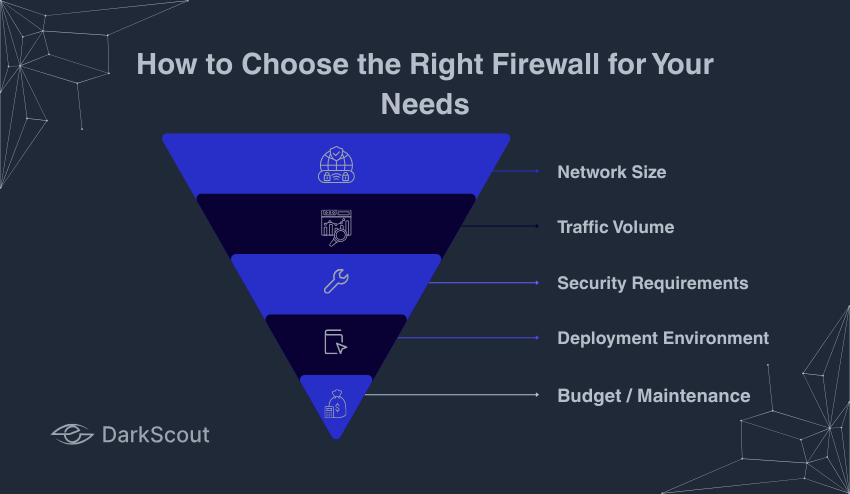
Factors to Consider:
- Network Size: Smaller networks can be met by software or UTM firewalls, but larger networks may require hardware or NGFW solutions.
- Traffic Volume: The traffic networks must be equipped with high-performance firewalls that would not create bottlenecks.
- Security Requirements: Consider the level of protection that is needed: simple packet filtering, deep inspection, or application-level security.
- Deployment Environment: Decision on the use of on-premises, cloud, or hybrid firewalls depending on infrastructure.
- Budget /Maintenance: Incorporate initial costs, subscription fees, and managerial costs.
Firewall Comparison Table:
| Firewall Type | Functionality | Deployment | Pros | Cons | Best For |
| Packet Filtering | Basic packet rules | Hardware/Software | Fast, simple | Limited security | Small networks |
| Stateful Inspection | Tracks active connections | Hardware/Software | More secure | Slightly slower | Medium networks |
| Proxy | Application-layer filtering | Software | Hides internal IPs, deep inspection | Slower, complex | Privacy-focused setups |
| NGFW | Deep packet inspection + IPS | Hardware/Software | Comprehensive security | Higher cost | Enterprises |
| WAF | Protects web apps | Hardware/Software | Defends web apps | Limited to apps | Websites, SaaS |
| Cloud Firewall | Cloud-based protection | Cloud | Scalable, easy management | Internet-dependent | Cloud & hybrid networks |
| UTM | All-in-one security | Hardware | Simplified management | Can impact performance | SMBs |
Common Mistakes to Avoid in Firewall Selection
It is known that organizations make mistakes and reduce the effectiveness even with the best firewall options. With this knowledge on these pitfalls, then you are likely to have the best protection of your firewall.
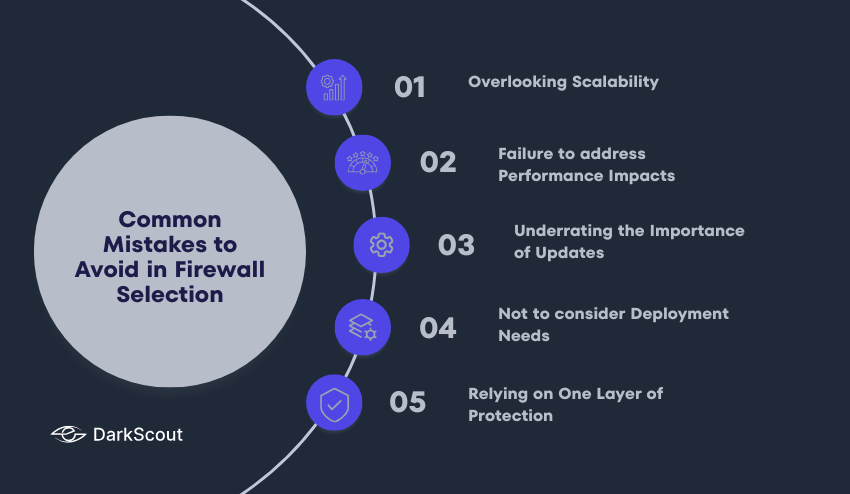
1. Overlooking Scalability
Choosing a firewall that would not accommodate the expansion of the network in future can lead to a performance issue. Constantly be ready to have additional traffic and additional devices.
2. Failure to address Performance Impacts.
Not every firewall, especially the NGFWs or UTMs, is capable of being scaled with network traffic. Test in the real world conditions.
3. Underrating the Importance of Updates.
Firewalls should also be updated with new software and rules regularly in order to protect against new threats. This is because failure to update your network can make it vulnerable.
4. Not to consider Deployment Needs.
Selecting a firewall that is not compatible with your network architecture i.e. cloud-based, hybrid, or on-premises, can cause blind spots or configuration difficulties.
5. Relying on One Layer of Protection.
Firewalls are required but not sufficient by themselves. Install antivirus, intrusion detection, and secure access controls in order to obtain the overall network security.
Conclusion
Firewalls have become a very important element of a network security policy. Understanding the types of firewall, their functionality, deployment methods, and filtering techniques helps you select the right solution for your needs.
Starting with simple packet filtering and moving up to the next-generation firewalls (NGFW) and cloud-based solutions, each of them has its own advantages, limitations, and applications. The process of selecting the appropriate firewall depends on the size of your network, the volume of traffic, and the security needs, and your budget.
You can make sure that your firewall can protect your network against cyber threats by not making the most common errors, such as overlooking scalability, performance, or updates. Taking time to learn about the type of firewall gives you the capability to apply a strong security system in your environment.