What Is ClickFix?
ClickFix is a social engineering attack technique where criminals trick victims into running malicious commands on their own devices by convincing them they are fixing a technical problem.
The victim does not download a file from a suspicious source. They do not open a dangerous email attachment. Instead, they open their own system’s command tools, paste in a script provided by the attacker, and press Enter. They infect themselves.
That is what makes ClickFix so effective and so dangerous. The attack bypasses most security software because the action taken is performed by the legitimate user, using legitimate system tools.
Quick definition: ClickFix is a social engineering technique where attackers present a fake error message, verification prompt, or system alert and instruct the victim to copy and paste a malicious command into Windows Run, PowerShell, or macOS Terminal to “fix” the issue. The command installs malware silently.
ClickFix was first observed in March 2024. By 2025, it had become the number one initial access method tracked by Microsoft Defender Experts, responsible for 47% of all observed initial compromises. ESET recorded a 517% surge in ClickFix detections in the first half of 2025 alone. It is no longer an emerging threat. It is the dominant attack technique right now.
Why ClickFix Is So Effective
To understand why ClickFix has spread so rapidly, you need to understand what it is designed to circumvent.
Modern security tools are built to detect malicious files, suspicious email attachments, and known exploit code. They scan downloads, monitor file execution, and flag known malware signatures.
ClickFix sidesteps all of that. Here is why it works so well.
- The victim is the delivery mechanism. Because the user manually opens a system tool and manually pastes in the command, the security software sees a legitimate user performing a legitimate action. No file is downloaded from a suspicious URL. No attachment is flagged. The attack looks indistinguishable from normal administrative behavior.
- It exploits human psychology. The attack presents a convincing problem and an easy solution. A person visits a page, sees a plausible error, and is given step-by-step instructions to fix it. The natural response is to follow the instructions. The attacker is exploiting the same instinct that makes people good troubleshooters.
- It evades email security. Many ClickFix campaigns do not include malicious attachments or obviously bad links in their phishing emails. The email may contain only a clean URL that passes through security filters. The attack happens on the landing page, not in the email itself.
- Malicious domains change faster than blocklists. Bitdefender noted in 2025 that most malicious domains used in ClickFix campaigns have already done their damage and been abandoned before any blocklist catches up. Attackers spin up new infrastructure faster than reputation services can flag it.
- Fileless execution leaves no trace. Most ClickFix payloads execute entirely in memory, using tools like PowerShell that are already trusted by the operating system. Nothing is written to disk in a way that traditional antivirus software scans.
How a ClickFix Attack Works, Step by Step
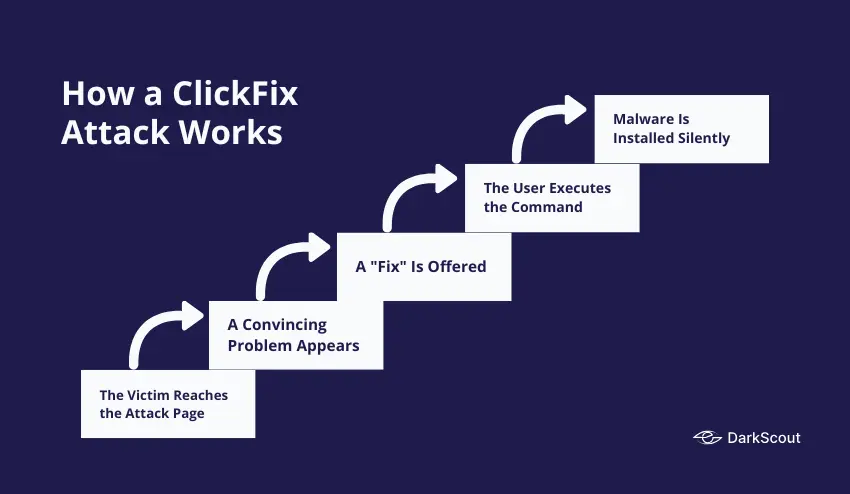
The attack follows a consistent pattern, even as the lures and payloads change.
Step 1: The Victim Reaches the Attack Page
There are many ways that the victim ends up on the malicious/infected page: They can receive a phishing email and click the malicious link; they can visit an authentic, clean site that has quietly had code injected into it, causing it to redirect; they can click on a malicious ad delivered from an authentic ad server. In one interesting case, hackers were actually infecting popular WordPress sites and using them to inject a ClickFix redirect into traffic.
Step 2: A Convincing Problem Appears
The fake/malicious page is showing a fake problem. Common issues that can be presented to the user include: A failing Cloudflare verification; a “page can’t be found” style error message; a fake CAPTCHA asking to prove they aren’t a bot; a Microsoft 365 login error; or a fake video conferencing login saying your mic/camera is not working. The page design almost always matches that of the original. A fake Cloudflare page looks like Cloudflare, a fake error page looks like an error page, etc.
Step 3: A “Fix” Is Offered
The page provides instructions to resolve the problem. These instructions always involve taking action outside the browser, on the operating system level. Typically, the user is told to press Windows + R to open the Run dialog, or to open PowerShell or Windows Terminal, and paste in a command that has already been silently copied to their clipboard by the malicious page.
The instruction is framed as routine. “Complete verification.” “Fix your connection.” “Confirm you are not a robot.” The language is designed to make the action seem normal and safe.
Step 4: The User Executes the Command
The user copies/pastes the command and hits enter. The command has been obscured so it does not appear to be alarming, but it will download and run malware, connect to a server under the control of an attacker, or directly drop the payload into memory.
Step 5: Malware Is Installed Silently
From this point, the attack proceeds like any other malware infection. A keylogger, infostealer, remote access tool, or ransomware loader is active on the device. The user sees nothing out of the ordinary.
ClickFix Lure Variations
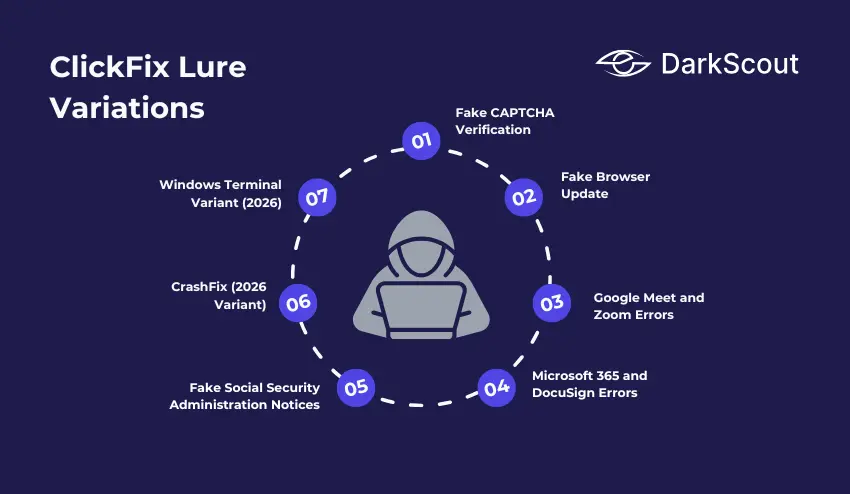
ClickFix is not a single fixed attack. It is a technique that attackers apply in dozens of different disguises. These are the most widely observed lure types.
1. Fake CAPTCHA Verification
The most common lure. The victim is shown a Cloudflare-style CAPTCHA that fails when clicked. The “fix” is to open the Run dialog and paste a verification command. The design is nearly identical to legitimate Cloudflare challenges, making it highly convincing.
2. Fake Browser Update
The page displays a banner or overlay claiming the user’s browser is out of date and must be updated to continue. This is also the core technique used by the SocGholish / FakeUpdates malware framework, which was the most detected malware globally in Q4 2024.
3. Google Meet and Zoom Errors
The victim receives a link to a video meeting. On arrival, the page claims there is a problem with their microphone or camera that must be fixed before they can join. The fix involves running a command on their system.
4. Microsoft 365 and DocuSign Errors
Fake login pages or document-sharing pages claim there is an authentication error, a session expiry, or a document that cannot be displayed without running a fix command. These lures work especially well in corporate environments where these tools are used daily.
5. Fake Social Security Administration Notices
In June 2025, a campaign impersonated the US Social Security Administration and used domain spoofing to convince recipients to “fix” an account issue by running a script. The emails even included legitimate SSA social media links in the footer to increase credibility.
6. CrashFix (2026 Variant)
A newer ClickFix variant was identified by Huntress in January 2026. A malicious Chrome extension called NexShield, disguised as a legitimate ad blocker, deliberately crashes the victim’s browser by flooding it with connection requests. A recovery prompt then instructs the user to run a fix command. The extension was distributed through the Chrome Web Store.
7. Windows Terminal Variant (2026)
Identified by Microsoft in February 2026. Instead of using the Run dialog, this variant instructs users to press Windows + X, open Windows Terminal, and paste a command. The switch to Windows Terminal is specifically designed to bypass detection rules written for suspicious Run dialog activity.
What Malware Does ClickFix Deliver?
ClickFix is a delivery mechanism, not a specific malware family. What gets installed depends entirely on who is running the campaign and what their goal is.
Documented ClickFix payloads include:
- Infostealers are the most common payload. Lumma Stealer, StealC, DanaBot, and SnakeStealer have all been distributed via ClickFix campaigns. These tools silently harvest saved passwords, session cookies, browser autofill data, and crypto wallet credentials, packaging them into stealer logs that are then sold on dark web markets.
- Remote Access Trojans (RATs), including NetSupport RAT, AsyncRAT, and QuasarRAT, give attackers persistent remote control over the infected device, allowing them to return and operate on the machine long after the initial compromise.
- Ransomware loaders use ClickFix for initial access and then deploy ransomware after reconnaissance. RansomHub and other ransomware groups have been linked to ClickFix-based initial access campaigns.
- Post-exploitation frameworks, including Cobalt Strike, Metasploit, and Empire C2, have been deployed through ClickFix, primarily in nation-state campaigns targeting government and defense organizations.
- Cryptominers use the victim’s processing power to mine cryptocurrency for the attacker, running silently in the background.
Real ClickFix Campaigns from 2024 to 2026
These are documented, attributed ClickFix campaigns that demonstrate the scale and range of this technique.
The Booking.com Hospitality Campaign
The financially motivated actor Storm-1865 has been operating a ClickFix campaign masquerading as Booking.com, targeting hotel and hospitality staff. The phishing emails allege problems with a reservation or review of a guest’s stay. Upon following ClickFix instructions, they were led to the installation of credential-stealing malware aimed at hotel management systems.
The Lampion Banking Infostealer Campaign (May 2025)
Microsoft documented an attack targeting government, finance, and transportation industries throughout Portugal, Switzerland, France, Hungary, Luxembourg and Mexico. The phishing emails contained ZIP files that would redirect users to a malicious tax authority site, hosted with a ClickFix lure. The malicious payload was Lampion, a banking infostealer.
The WordPress Mass Injection Campaign (December 2025 to 2026)
Rapid7 discovered a ClickFix campaign that had infected over 250 WordPress sites in 12 countries, compromising regional news websites, small local businesses, and a US Senate candidate’s official page.
A fake Cloudflare CAPTCHA was displayed on the compromised websites and would install a DoubleDonut Loader, which injects a shellcode into Windows’ memory. The infrastructure behind the campaign has been using the IClickFix framework to inject the infection onto more than 3800 WordPress sites since 2024.
The NetSupport RAT DocuSign Campaign (May 2025)
Unit 42 at Palo Alto Networks discovered a highly prolific ClickFix campaign delivering the NetSupport RAT using fake DocuSign pages. Victim machines from numerous sectors have been redirected to spoofed DocuSign document viewing pages, prompting the users to run a fix command in order to view their documents.
The Lumma Stealer MSHTA Campaign (April 2025)
An extensive ClickFix campaign utilized an MSHTA command with unique per-target identifier commands in order to deliver their Lumma Stealer payloads, allowing for per-target delivered payloads and avoiding repeated scans from security researchers. This campaign has been known to target the healthcare, finance, and retail sectors among others.
The Latrodectus Campaign (March to April 2025)
Attackers distributing Latrodectus malware switched to ClickFix as their initial access method in early 2025. Compromised legitimate websites used ClearFake infrastructure to redirect visitors to fake verification pages. When victims ran the PowerShell command, they saw only a “Cloud Identificator” number on screen, designed to make the execution look like a routine authentication step.
Who Is Using ClickFix?
ClickFix began as a cybercriminal technique. It has since been adopted by some of the most sophisticated threat actors in the world.
1. Cybercriminal Groups
Initial access brokers, ransomware affiliates, and infostealer operators were the first to adopt ClickFix at scale. TA571 is credited with the first observed ClickFix deployment in March 2024. The technique spread rapidly through the cybercriminal ecosystem because it is simple to implement and difficult to detect. Ready-made ClickFix builder tools are now commercially available on dark web forums, meaning any attacker can deploy their own campaign with minimal technical skill.
2. Nation-State Threat Actors
Between October 2024 and February 2025, Proofpoint documented ClickFix adoption by four separate nation-state groups. Their campaigns targeted defense contractors, government agencies, think tanks, and organizations in the Middle East, North America, and Europe.
North Korea’s Kimsuky (TA427) targeted Korean policy think tanks using emails impersonating Japanese diplomats. Victims were instructed to run PowerShell commands that installed QuasarRAT while displaying decoy documents to avoid suspicion.
Iran’s MuddyWater (TA450) sent phishing emails to 39 organizations across the Middle East in November 2024, impersonating Microsoft with a fake critical security update. The PowerShell script installed a remote monitoring tool used for surveillance.
Russia’s APT28 (TA422) used ClickFix in October 2024 with a fake Google Spreadsheet lure that led to a spoofed reCAPTCHA page. Running the script established an SSH tunnel and deployed Metasploit for backdoor access.
Russia-linked UNK_RemoteRogue targeted defense contractors in December 2024 using compromised Zimbra email servers. Their campaign included a YouTube tutorial video showing victims how to run the PowerShell command, adding a layer of social proof that increased compliance.
How ClickFix Connects to Dark Web Threats
ClickFix is not an isolated threat. It sits at the beginning of a longer attack chain that flows directly to the dark web.
When ClickFix successfully delivers an infostealer, the stolen data is packaged into what are known as stealer logs and uploaded to dark web markets within hours. These logs contain saved passwords, session cookies, email credentials, and banking details from the infected device.
From there, the credentials are used in credential stuffing attacks against other accounts, sold to other criminals who specialize in account takeover, or used directly by the attacker to access corporate systems, banking accounts, or email.
This is the same pipeline that runs from malware campaigns and drive-by downloads to the dark web. ClickFix is simply a newer and currently more effective method of getting malware onto a device in the first place.
Monitoring the dark web for stolen credentials is one of the most effective ways to detect when a ClickFix campaign has succeeded against your organization, even if your security tools missed the initial execution.
DarkScout’s dark web monitoring continuously scans breach databases, stealer log repositories, and dark web markets for credentials tied to your domains and email addresses. When data from a successful ClickFix infection surfaces, DarkScout alerts your team immediately.
How to Prevent ClickFix Attacks
ClickFix is a social engineering attack, which means no single technical control stops it completely. Effective defence requires layers.
1. Train Every Employee to Recognize the Pattern
The most important defence is awareness. Every person in your organization should know one rule: no legitimate website, verification system, or software update will ever ask you to open your command line and paste in a script.
If a webpage instructs you to press Windows + R, open PowerShell, open Terminal, or paste anything into a system dialog box, it is an attack. Close the browser and report it. This is the clearest and most actionable signal that ClickFix training can provide.
2. Restrict Script Execution for Standard Users
Standard user accounts should not be able to execute PowerShell scripts without administrative approval. Apply execution policies through Group Policy that block unauthorized script execution. Change the default Windows behavior so that JavaScript files (.js) open in Notepad rather than executing automatically through Windows Script Host.
This does not stop every variant, but it stops the most common ones cold. If the script cannot run, the attack fails.
3. Block the Win + R Key Combination
For most employees, the Windows Run dialog has no legitimate daily use. Blocking the keyboard shortcut via Group Policy removes one of the most common ClickFix execution paths entirely.
It is worth noting that newer variants do rely on Windows Terminal, Windows Search and various other access methods, so this restriction should be combined with other script execution restrictions
4. Deploy DNS Filtering
DNS filtering blocks connections to known malicious domains, including the command-and-control servers that ClickFix payloads phone home to and the traffic distribution systems that redirect victims to attack pages. This adds a network-level layer of protection that operates regardless of which browser or device the user is on.
In documented cases from 2025, organizations with DNS filtering in place blocked ClickFix infections automatically at the C2 communication stage, even after the user had executed the command.
5. Use Endpoint Detection and Response (EDR)
ClickFix payloads are frequently fileless, running in memory through legitimate system tools. Traditional antivirus misses this. EDR systems monitor the actual real-time behavior occurring on a machine, looking for phenomena such as a browser process launching PowerShell, odd out-of-band network connections, and memory injection into a valid Windows executable.
EDR is the detection layer that catches what other tools miss.
6. Apply Strict Browser Extension Policies
A variant of the ClickFix malware (Crashfix) was delivered through a malicious Chrome extension via the Chrome Web Store. The extension QuickLens, which was used by tens of thousands of users, was hijacked in Feb 2026 and turned into a ClickFix delivery method. Maintain an allow list of browser extensions.
7. Protect WordPress Sites You Operate
If your organization runs WordPress websites, ensure the admin login panel is not publicly accessible. The IClickFix framework specifically targeted WordPress sites with exposed admin pages. Use a web application firewall, keep all plugins updated, and monitor for unauthorized JavaScript injections in your site’s source code.
8. Monitor for Stolen Credentials After the Fact
Even with strong prevention, some attacks succeed. The window between a successful ClickFix infection and an attacker using the stolen credentials can be very short.
Run a free email scan to check whether your credentials have already surfaced in breach data. For businesses, a website scan reveals your domain’s current exposure. For continuous protection,
If you suspect a ClickFix infection has already occurred, follow a structured data breach response plan immediately. Reset affected credentials, check for unauthorized logins, and isolate the affected device.
Final Thoughts
ClickFix is the most important cyberattack technique to understand right now.
It requires no exploit kit, no vulnerability, and no file download. It works by convincing a person to do something that looks completely reasonable. That is why it accounts for nearly half of all initial compromises tracked by Microsoft, why it surged 517% in a single year, and why nation-state hackers from three different countries adopted it within a few months of each other.
The defences exist. Restricting script execution, training employees, deploying DNS filtering, and monitoring for stolen credentials on the dark web are all proven controls. But none of them work if they are not in place before the attack arrives.
The time to prepare for ClickFix is now, not after an employee runs the command.