Your MFA is not as safe as you think.
Multi-factor authentication was built to stop attackers who steal your password. And for a long time, it worked. But criminals found a way around it that requires no hacking, no malware, and no technical skill whatsoever. They simply flood your phone with approval requests until you give in.
That technique is called push bombing. It is behind some of the most damaging corporate breaches of the last three years, including Uber, Cisco, MGM Resorts, and Marks and Spencer. It succeeded in more than 20% of social engineering attacks against the public sector in 2025. And it is now a core tool used by some of the most active ransomware groups operating today.
In this guide, you will learn exactly what push bombing is, why it works on people who know better, which organizations it has already destroyed, and the specific steps you need to take to make sure it does not work on you.
What Is Push Bombing?
Push bombing is a cyber attack method where the attacker, who already has your username and password, inundates your device with MFA push notifications with the goal that you eventually accept one due to the stress, confusion, or weariness it induces.
Every time the attacker attempts to log into your account, your authenticator app receives a push notification asking you to approve the login. The attacker does this dozens or even hundreds of times in a row, sometimes over hours, sometimes overnight while you are asleep.
The goal is simple. Wear you down until you tap Approve.
Quick definition: Push bombing, also called MFA bombing, MFA fatigue, prompt bombing, or MFA spamming, is a social engineering attack where an attacker floods a victim’s authenticator app with repeated push notification requests using already-stolen credentials, until the victim approves one and grants the attacker access.
The attack requires no exploit kit, no malware, and no technical vulnerability. It requires only two things: your stolen credentials and your phone.
Push Bombing vs MFA Fatigue: Is There a Difference?
These terms are used interchangeably across the security industry, and for good reason. The underlying mechanic is identical.
MFA fatigue is the state of mind the attacker is trying to induce: the user receiving notification after notification until the user stops reviewing each notification and hits approve without thinking.
Push bombing describes the action the attacker takes to create that state: bombarding the user with push requests in rapid succession.
In practice, every push bombing attack is designed to create MFA fatigue, and MFA fatigue attacks are executed through push bombing. The terms refer to the same threat from two different angles.
You will also see it called prompt bombing, MFA flooding, or MFA spamming. All of these describe the same attack pattern.
The MITRE ATT&CK framework classifies this behavior under Technique T1621: Multi-Factor Authentication Request Generation.
How Push Bombing Works, Step by Step
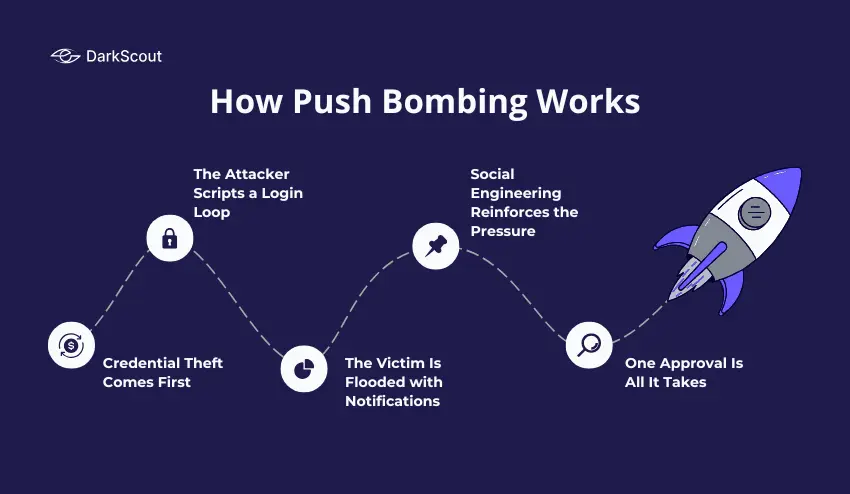
Push bombing has a constant attack chain. By knowing all steps of the attack chain, you are aware of the points where an attack could be interrupted.
Step 1: Credential Theft Comes First
Push bombing cannot happen without valid credentials. The attacker needs your real username and password before the attack can begin.
Those credentials are obtained in one of several ways. They may come from a previous data breach, purchased from a dark web market where stolen credential databases are sold for as little as a few dollars. They may be harvested through a phishing campaign, a drive-by download, or a ClickFix attack. They may be extracted from stealer logs generated by infostealer malware running silently on a victim’s device.
The 2025 Verizon DBIR notes that 81% of breaches involve weak or stolen passwords, while over 3.8 billion credentials were leaked in the first half of 2025. That is the pool attackers are drawing from.
Step 2: The Attacker Scripts a Login Loop
Once an attacker has legitimate credentials, they will script a loop attempting to authenticate with the target’s Identity Provider-whether Azure AD, Okta, Duo or otherwise.
Every loop iteration attempts a login with the real credentials. Every failed login, because MFA has not been approved, generates a new push notification on the victim’s device.
The attacker does not need to be at a keyboard for this. The loop runs automatically, sending dozens or hundreds of notifications with no human involvement on the attacker’s side.
Step 3: The Victim Is Flooded with Notifications
The victim’s phone starts lighting up. One notification. Then another. Then another. Sometimes the notifications arrive every few seconds. Sometimes they are spaced out over hours to catch the victim at a distracted moment, during a meeting, while commuting, late at night, or early in the morning.
Attackers preferentially launch push-bombing campaigns between midnight and 5 a.m. local time, or during weekends, when victims are sleeping, traveling, or distracted.
Step 4: Social Engineering Reinforces the Pressure
Many push bombing attacks do not rely on the notifications alone. The attacker adds a second layer: a phone call or message impersonating IT support or a helpdesk agent.
The script is usually a variation of the same message. “We are seeing unusual activity on your account. You will receive a verification notification. Please approve it to confirm your identity and stop the alerts.”
The victim is being trained that approving the notification is the right thing to do. When, in fact, approving it is exactly what gives the attacker access.
Since 2025, there has been a 148% rise in AI impersonation scams that fool many into believing fake calls. AI voices for CEOs and IT staff are often used to further add authenticity to the calls.
Step 5: One Approval Is All It Takes
The attack is just about the split second the victim’s guard is dropped. At 2 am, they’re sleepy, annoyed that the notification appeared the twentieth time that hour, or they’ve been convinced by the fake IT representative; they tap “Approve.”
The attacker’s session is authenticated; they are in.
Why Push Bombing Works So Well
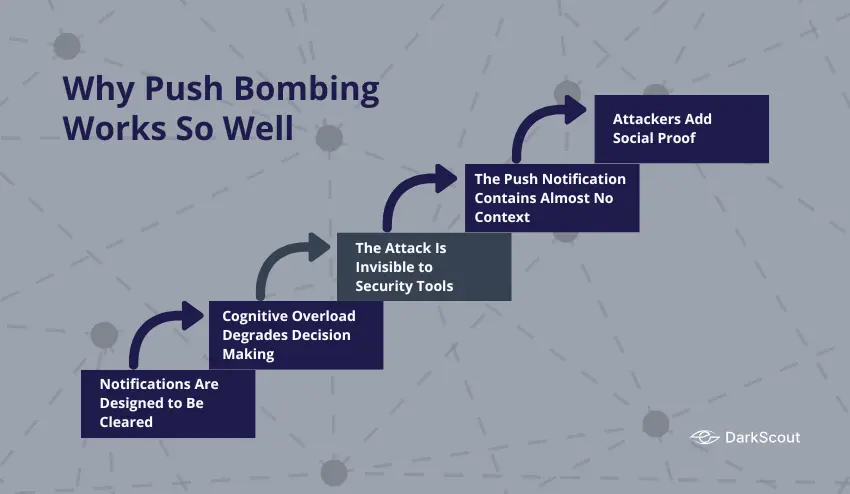
Push bombing succeeds not because of a flaw in the technology, but because of a flaw in how humans interact with technology under pressure.
1. Notifications Are Designed to Be Cleared
The entire UX design of mobile notifications is built around quick action. Swipe, tap, dismiss. People clear dozens of notifications a day without reading them carefully. Push bombing exploits that conditioned behavior.
2. Cognitive Overload Degrades Decision Making
Push notifications generate cognitive debt. Each unresolved alert demands mental attention. When notifications arrive in a torrent, the brain shifts from deliberate evaluation to pattern-completion heuristics. Instead of asking “Did I initiate a login?”, the brain starts asking “What is the fastest way to make these stop?”
3. The Attack Is Invisible to Security Tools
Because the authentication request is technically legitimate, using real credentials against a real endpoint, the identity provider cannot distinguish it from a genuine login. No malware is executing. No suspicious file is being downloaded. The attack looks exactly like a user who keeps failing to approve their own login.
4. The Push Notification Contains Almost No Context
A standard MFA push notification tells you almost nothing. It shows the name of the app and an Approve or Deny button. It typically doesn’t tell you the IP of the attempted login, the geographical location of the login, nor the device that is requesting the login. This lack of context prevents the victim from easily being able to distinguish the attempt as fraudulent.
5. Attackers Add Social Proof
When an attacker is on the phone and describes the situation, that there is an IT issue that is being resolved, and asks you to approve the request, there is social pressure to comply. Most people are willing to be helpful to someone who presents themselves as an IT professional.
Real Push Bombing Attacks and Their Consequences
These are not theoretical scenarios. Push bombing has caused hundreds of millions of dollars in real damage.
Uber (2022)
In September 2022, an 18-year-old attacker acquired the credentials for an Uber contractor through the dark web. This attacker pushed notifications to the Uber contractor over and over again. Eventually, the employee failed to respond and accepted the request after receiving a WhatsApp call from the attacker, pretending to be from Uber IT.
Upon entering Uber’s systems, the attacker then had access to internal systems, Slack, HackerOne reports, and internal tools. The sensitive data exposed by the attacker in this intrusion was both sensitive security vulnerability reports, as well as other internal Uber data. An attack that involved just a single push notification approving it effectively had gained complete control over Uber’s entire internal network.
Cisco (2022)
Scattered Spider gained the credentials for a Cisco employee’s Google personal account, and in this account, the employee’s Cisco VPN credentials were stored. From this, the attacker pushed bombing an employee’s mobile device and conducted vishing calls posing as Cisco IT support, until the employee accepted a push notification.
From the approved push notification, the attacker gained further network access and exfiltrated around 2.8GB of data consisting of internal documents and engineering documents.
MGM Resorts (2023)
Scattered Spider socially engineered MGM Resorts helpdesk personnel to bypass MFA and log into accounts for which they had acquired valid login credentials via credential phishing and historical infostealer compromises.
The breach resulted in a 36-hour outage, a $100M hit to its Q3 results, one-time cyber consulting fees in the region of $10M, and a class-action lawsuit later settled for $45M.
The access began with a ten-minute LinkedIn search and a phone call to the MGM helpdesk. Push bombing was used to convert stolen credentials into authenticated sessions once helpdesk staff were socially engineered into resetting MFA for targeted accounts.
Caesars Entertainment (2023)
At the same time as the MGM attack, Scattered Spider breached Caesars Entertainment using similar techniques. Caesars reportedly paid approximately $15 million in ransom to prevent stolen data from being leaked. The breach exposed the loyalty program data of tens of millions of customers.
Marks and Spencer (2025)
In April 2025, Scattered Spider was involved in a ransomware attack on UK retailer Marks and Spencer through the use of DragonForce ransomware, which impacted 1,049 stores and caused the share price to fall by approximately 7%. Initial access methods were identical: social engineering of helpdesk personnel coupled with MFA fatigue to redeem compromised credentials for network access.
Who Is Most at Risk?
Push bombing can target anyone who uses push-based MFA. But certain people and organizations face significantly higher risk.
1. Organizations Using Push-Based MFA Without Additional Controls
Organizations that use push notifications as the only MFA factor, and do not utilize number matching, rate limiting or further context in the push notification, will be left with a large hole in their security.
2. Remote and Hybrid Workforces
These workers are already accessing the networks; they are at risk from their home networks and are unlikely to have an IT support staff member nearby to verify a pushed MFA notification. Many of these individuals are using their personal devices, and are harder to enforce security on them than on corporate assets.
3. IT Help Desks and Administrators
Admins are constantly hit with push notifications, so they are much more likely to approve the prompt without thinking. As such, the IT help desk and privileged IAM accounts within a company are major targets of MFA bombing attacks. Administrators’ accounts are preferred because one approval gives the attackers so much more access than is gained with a regular user account.
4. Finance, Healthcare, and Government Sectors
The more value there is in an organization’s data, the more likely they are to be attacked. Those with access to financial data, patient records, or governmental data are high-value targets, and organizations dealing in these fields are disproportionately targeted. These types of organization generally have the greatest payout value for the groups, making it appealing to attacks like Scattered Spider.
5. Anyone Whose Credentials Are Already on the Dark Web
Push bombing always starts with stolen credentials. If your username and password are already in a breach database or stealer log being traded on the dark web, you are already in the first stage of a potential push bombing attack.
What Happens After a Successful Push Bomb?
Approving a single push notification is rarely the end of the incident. It is usually the beginning of a much larger compromise.
Once inside, attackers move quickly. They search for higher-privilege accounts to escalate to. They access cloud systems, internal communication platforms, and file storage. They look for connected systems that can be reached through the compromised identity.
In many documented cases, attackers then deploy ransomware after establishing sufficient access. In others, they exfiltrate data for sale on dark web markets or use it for extortion without encryption.
The compromised account itself becomes a tool. Attackers use it to send phishing messages to colleagues from a trusted internal address, to request helpdesk password resets for other accounts, and to access systems that would otherwise require additional authentication.
The stolen credentials and session data often end up on the dark web as well, sold as part of stealer logs or fresh access listings that other criminals can buy and use independently.
How to Prevent Push Bombing
Preventing push bombing requires changes to both technology and behavior. Neither alone is sufficient.
1. Enable Number Matching in Your MFA App
Number matching is the single most effective technical control against push bombing. When a login is attempted, a number is displayed on the login screen. The user must type that specific number into their authenticator app to approve the request.
This eliminates accidental approvals entirely. A user half-asleep receiving a push notification cannot approve it without seeing the correct number from the actual login screen. Attackers bombarding a victim’s phone gain nothing if the victim never sees the number.
Microsoft, Duo, and most major MFA providers now support number matching. Enable it. If your provider does not support it, consider switching to one that does.
2. Add Location and Application Context to Push Prompts
Configure your MFA platform to include additional context in every push notification: the geographic location of the login attempt, the application being accessed, and the IP address of the requesting device.
When a push notification tells a user that a login is being attempted from an IP address in Eastern Europe to access your Okta admin console at 3 am, the user has the information they need to deny it immediately.
3. Implement Rate Limiting on MFA Requests
Rate limiting allows you to cap the number of push notifications a user may receive over a specific timeframe. After a number of failed MFA prompts, the user’s account may be locked out and require a separate authentication method or more security questions to proceed.
This does not prevent the attack in its entirety; however, it considerably slows down the attack and alerts your security team to what may be happening before the victim can reach his or her limit.
4. Switch to Phishing-Resistant MFA
The ideal long-term solution is to deprecate push-based MFA entirely for high-value accounts and implement FIDO2-compliant authentication.
A FIDO2 hardware security key uses challenge-response against an asymmetric public/private key pair residing on hardware. The response can only ever be tied to an origin domain and, therefore, cannot be replayed through a phishing proxy to a different domain.
Passkeys extend FIDO2 to platform authenticators built into modern smartphones and laptops, using biometrics to authenticate. Because the private key never leaves the device and the credential is domain-bound, passkeys are resistant to push bombing entirely. There is no push notification to approve.
CISA now formally recommends FIDO2 as the gold standard for phishing-resistant MFA and mandates it for U.S. federal agencies. TOTP-based authenticator apps that generate time-based codes are also significantly more resistant to push bombing than push notification apps, as they require the attacker to intercept the code in real time rather than simply waiting for an approval.
5. Train Every Employee on This Specific Attack
Every person in your organization who uses push-based MFA needs to know one rule: if you receive MFA notifications you did not initiate, do not approve them, and report them immediately.
Training should use real examples. The Uber breach is a compelling case study because the victim was doing everything right up until the moment a fake IT call provided a convincing explanation. Teaching employees to treat any unsolicited MFA notification as a potential attack, regardless of follow-up calls, is the behavioral control that complements the technical ones.
6. Establish a Verification Protocol for IT Support Calls
IT employees must NEVER call you on the phone and ask you to approve an MFA notification if anyone claims that they will; treat it as social engineering.
Provide an internal number where employees can call back to verify that any person claiming to be from IT actually is, eliminating the spoofing of IT personnel on the telephone.
7. Monitor Dark Web Exposure for Stolen Credentials
Push bombing requires stolen credentials to start. If you know your credentials are exposed before an attacker uses them, you can change them and cut off the attack before it begins.
DarkScout’s dark web monitoring continuously scans breach databases, stealer log repositories, and dark web markets for credentials tied to your organization’s domains. When compromised credentials surface, DarkScout alerts your team immediately.
Run a free email scan now to check whether your credentials are already exposed. For businesses, a website scan reveals your domain’s full exposure across known breach sources.
What to Do If You Are Being Push Bombed Right Now {#right-now}
If your phone is receiving unexpected MFA notifications right now, follow these steps immediately.
- Do not approve any notification. Even if a caller tells you to. Even if the notification says it will time out. Even if someone on the phone claims to be from IT or security. Do not approve it.
- Deny every notification actively. Tap Deny on every request that comes through. This signals to your security team through logs that something is wrong and may trigger automated alerts in your identity platform.
- Report it immediately. Contact your IT or security team through a verified internal channel, not through a number a caller provides. If you are an individual, contact the support team of the service being targeted and ask them to temporarily lock your account.
- Change your password from a clean device. Use a device you trust and a network you control to change the password for the account being targeted. This invalidates the attacker’s stolen credentials and stops the push flood.
- Check your account for unauthorized access. Review recent login activity for the targeted account. Look for sessions from unfamiliar locations or devices.
- Run a dark web scan. Check whether your credentials have already been sold or shared beyond the current attacker. Use DarkScout’s free email scan to check immediately.
For a full incident response playbook, see our data breach response plan.
Final Thoughts
Push bombing is one of the clearest examples of attackers adapting to defenses rather than breaking through them.
MFA adoption grew. Attackers responded by targeting the human who approves the MFA request. The technology did not fail. The people behind it were worn down until they made a single mistake, and that single mistake was enough.
The defense requires layers. Number matching and phishing-resistant MFA close the technical gap. Training and verification protocols close the human gap. And monitoring for stolen credentials closes the upstream gap, stopping the attack before the first notification ever arrives.
The organizations that were hit hardest, MGM, Caesars, Uber, had MFA in place. That was not enough. What they were missing was a complete picture of where their credentials stood and whether they were already in the hands of people who knew how to use them.