34% of websites still have suboptimal SSL configurations in 2026.
That’s not a small number. It means roughly one in three sites running HTTPS has a misconfiguration that weakens the encryption it’s supposed to provide, whether that’s a deprecated protocol still enabled, a weak cipher suite, a missing intermediate certificate, or a security header that’s absent or misconfigured.
And in 2026, the SSL/TLS landscape just got more demanding. Certificate lifetimes have dropped to 199 days under new CA/Browser Forum requirements, meaning renewals happen more than twice as often. Manual certificate management is no longer viable. And organizations that haven’t yet disabled TLS 1.0 and 1.1 are sitting on open compliance failures under PCI DSS, HIPAA, and GDPR.
Simply having an SSL certificate installed isn’t enough. This guide explains what an SSL/TLS security check actually tests, how to run one for free, how to read and act on the results, and what the 2026 changes mean for how you manage your site’s encryption going forward.
What Is an SSL/TLS Website Security Check?
Performing an SSL/TLS security audit involves automatically evaluating your server’s encryption configuration for its compliance with best security practices.
This is just not a basic test to see if you have an SSL/TLS certificate on your web server. This checks to see which protocol versions and cipher suites your server supports, the state of any certificate chains, security headers used and any quirks in your server configuration that can be exploited.
The test returns not only information on whether encryption exists but whether it is sufficiently secure to adequately protect your website visitors.
This matters because the presence of a padlock and the strength of the underlying encryption are two different things. A site can have a valid certificate and display the padlock while still using protocols deprecated years ago, cipher suites vulnerable to known attacks, or missing security headers that browsers rely on to enforce secure behavior. Understanding what to look for before trusting a padlock is covered in detail in the how to check if a Website Is Secure guide.
SSL vs TLS: Why the Terminology Still Confuses Everyone
SSL (Secure Sockets Layer) and TLS (Transport Layer Security) are related but not the same thing, and the terminology is used inconsistently everywhere, which creates genuine confusion.
Here’s the accurate picture:
SSL is the original protocol developed by Netscape in the 1990s. SSL 2.0 and SSL 3.0 were both deprecated after critical vulnerabilities were discovered. SSL is no longer used anywhere on the modern internet. When browsers blocked SSL 3.0 in 2015 following the POODLE vulnerability, that was the end of SSL in practice.
TLS is SSL’s successor, developed to fix SSL’s security flaws. TLS 1.0 was released in 1999, followed by TS 1.1 in 2006, and TLS 1.2 (the third version of the protocol) in 2008. TLS 1.3, the new version, was finalized in 2018 and is currently implemented by 75.3% of the best websites in the world.
Despite SSL being technically obsolete, the industry still uses “SSL certificate” as the common term for what is technically a TLS certificate. When your hosting provider says “install an SSL certificate,” they mean a certificate used with the TLS protocol. The certificate itself doesn’t dictate which protocol version is used. That’s determined by your server configuration.
The practical implication: owning an “SSL certificate” tells you nothing about which TLS version your server is actually using. Your certificate could be technically valid while your server is still negotiating TLS 1.0 connections, which is a serious vulnerability and a compliance failure.
What a Security Check Actually Tests
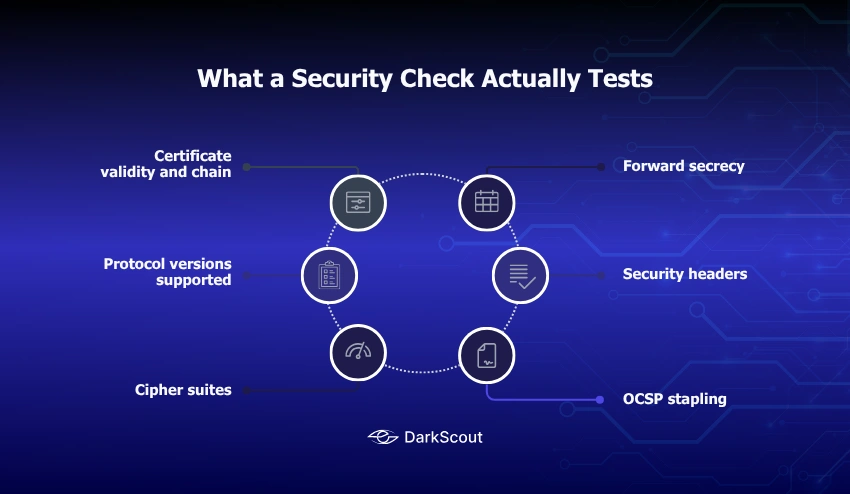
A thorough SSL/TLS security check examines six distinct areas of your encryption configuration.
1. Certificate validity and chain
Verifies that your certificate is currently valid, issued by a trusted Certificate Authority, covers the exact domain(s) being served, and that the complete certificate chain from your certificate to the root CA is correctly configured. A broken or incomplete chain causes “untrusted certificate” warnings in some browsers even when the certificate itself is valid.
2. Protocol versions supported
Which versions of TLS will your server accept? The current secure configuration accepts TLS 1.2 and TLS 1.3. TLS 1.0 and TLS 1.1 were formally deprecated by the IETF in RFC 8996, blocked by all major browsers in 2020, and are banned outright by PCI DSS and NIST SP 800-52. Any server still accepting TLS 1.0 or 1.1 connections fails compliance checks and receives a degraded security grade.
3. Cipher suites
The actual set of encryption algorithms your server will accept to create a secure connection. There are a number of cipher suites known to be compromised or fundamentally broken: RC4, DES, 3DES, MD5, and SHA-1 are all vulnerable or insecure. An example 2026 secure configuration includes ECDHE (forward secrecy) and AES-GCM or ChaCha20-Poly1305 for encryption.
4. Forward secrecy
Forward secrecy (sometimes referred to as Perfect Forward Secrecy or PFS) is achieved if every session has a fresh, unique encryption key that can’t be linked back to your server’s private key. Without forward secrecy, the attacker who gets hold of your private key at some future point could decrypt recorded network communications that use the compromised private key. TLS 1.3 is designed to enable forward secrecy. TLS 1.2 only supports forward secrecy if particular cipher suites are selected.
5. Security headers
HTTP response headers that instruct browsers how to handle your content securely. These are separate from the certificate itself but directly relevant to the overall security of your HTTPS implementation. HSTS, CSP, and several others belong in this category.
6. OCSP stapling
Online Certificate Status Protocol (OCSP) stapling allows your server to provide a signed timestamp of your certificate’s validity status, rather than requiring browsers to check separately. Without OCSP stapling, certificate revocation checking is slow and sometimes unreliable. With it, revocation information is delivered efficiently as part of the TLS handshake.
The 2026 Changes You Need to Know About
2026 has brought significant changes to SSL/TLS certificate management that affect every website owner, not just large enterprises.
1. Certificate lifetimes are dropping to 199 days
The CA/Browser Forum, the industry body that sets certificate standards, has approved a reduction in maximum certificate validity from 398 days to 199 days. Major Certificate Authorities including DigiCert and Sectigo are implementing this across 2026. Certificates issued for one year are no longer available from compliant CAs.
The practical consequence: renewal cycles that were annual are now roughly every six months. Manual renewal processes that were manageable annually become genuinely burdensome at this frequency. Automation is no longer optional for any organization managing more than a handful of certificates.
2. Domain Control Validation reuse periods are shortening
Domain Control Validation (DCV) is the process by which a CA confirms you control a domain before issuing a certificate. Previously, DCV results could be reused for up to 398 days. Under the new requirements, DCV must be repeated more frequently, reducing the window during which an unauthorized party who might have briefly controlled a domain could maintain a certificate.
3. Multi-Perspective Issuance Corroboration (MPIC)
A new requirement in which the CAs has to check domain control and CAA records across multiple networks prior to the issuing of a certificate (and thereby prevent the possibility of a certificate being issued through an attack such as BGP hijacking or DNS attack).
4. DNS-based validation is becoming preferred
More and more widely recommended over its HTTP equivalent is the DNS-based domain validation, which provides better targeting which, in turn, makes it more automation-ready for certificate issuance.
All of these are designed to now make Certificate management the baseline; it is not the advanced.
How to Run a Free SSL/TLS Security Check
Several reliable free tools provide comprehensive SSL/TLS security testing. You don’t need to install anything.
1. Qualys SSL Labs (ssllabs.com/ssltest)
The industry standard. SSL Labs provides the most comprehensive free SSL/TLS report available, grading your configuration from A+ to F and examining every dimension of your encryption setup. It’s free, requires no registration, and typically takes two to five minutes to complete.
To run it: go to ssllabs.com/ssltest, enter your domain name, and click Analyze. The results appear progressively as the scan runs. The final report is detailed and sometimes intimidating in length. The section-by-section guide below explains how to read it.
2. Mozilla Observatory (observatory.mozilla.org)
Tests your HTTPS configuration alongside security headers. Useful for a combined view of protocol security and header configuration in a single report. Grade A or higher is the target.
3. ImmuniWeb SSL Security Test (immuniweb.com/ssl/)
Checks TLS configuration against NIST guidelines, PCI DSS requirements, and HIPAA expectations. Particularly useful if you’re working toward compliance in regulated industries.
4. testssl.sh (command line)
For serveradmins used to command-line tools, testssl.sh is an open source script that performs all sorts of TLS tests without transmitting anything to a third-party. Handy for internal servers, or situations where you don’t want to send your domain info to an external service.
6. OpenSSL (command line)
Quick protocol-specific checks without a full report. For example:
openssl s_client -connect yourdomain.com:443 -tls1If this command establishes a connection, TLS 1.0 is still active on your server. Replace -tls1 with -tls1_1, -tls1_2, or -tls1_3 to check each version individually. A failed connection means that protocol version is not supported, which is what you want for TLS 1.0 and 1.1.
For broader website security scanning beyond the SSL/TLS layer, website scanner tools cover the range of options for full security audits.
Reading Your SSL Labs Report: Section by Section
The SSL Labs report contains a lot of information. Here’s what each section actually means and what to focus on.
Overall Grade
The letter grade at the top summarizes the entire configuration. A and A+ are the targets. B means something significant could be improved. C or below usually means a serious configuration problem. F means a critical failure like an expired certificate or no HTTPS at all.
One important nuance: a site can receive an A grade while still having some configurations that could be improved. The grade reflects whether serious problems are present, not whether every possible optimization is in place.
Certificate Section
Displays the subject (domain) that your certificate is issued for, its issuer (the CA that issued it), its validity dates, and signature algorithm.
What to check here:
- The Subject is required to be an exact match of the domain you want to serve, including subdomains.
- If a Call Valid Until date is in the next 30 days, then it is overdue for renewal. The Valid Until date should be at least 30 days away.
- The Issuer needs to be a known CA. Otherwise, browsers will generate warning messages about an unknown issuer.
- The Signature Algorithm for the certificate should be SHA256WithRSA or SHA384 for the ECDSA certificate. SHA1 is no longer recommended.
Configuration Section
The most technically detailed part. It explains what versions of the TLS protocol your server supports, what cipher suites your server offers, and gives details about the key exchange algorithms and encryption algorithms.
The support for the protocols is represented here with green ticks for TLS 1.3 and TLS 1.2. The red flags indicate to us that enabling these protocols (TLS 1.0, 1.1) is not supported anymore.
Cipher Suites: Look for cipher suites that include ECDHE for key exchange (indicated in the name). Any cipher suite with RC4, DES, 3DES, EXPORT, or NULL in its name is a serious problem.
Authentication Section
Shows whether your server provides a signature that allows the browser to verify its identity. This should always show “Supported” for a correctly configured server.
Vulnerabilities Section
SSL Labs checks for a list of known TLS vulnerabilities, including BEAST, POODLE, DROWN, Heartbleed, and ROBOT. Each should show “No” or “Not vulnerable.” Any “Yes” here requires immediate attention.
Handshake Simulation
Shows how different clients (browsers, mobile devices, older operating systems) would negotiate a connection to your server. Useful for identifying whether your security configuration might cause connection failures for legitimate users on older devices.
What the Grades Mean Practically
- A+ Excellent configuration. TLS 1.3 enabled, TLS 1.2 permitted with secure cipher suites only, TLS 1.0 and 1.1 disabled, HSTS enabled with a long max-age, forward secrecy supported, OCSP stapling enabled, no known vulnerabilities. This is the target for any organization that handles sensitive data or is subject to compliance requirements.
- A Strong configuration with no serious problems. May be missing HSTS or have minor configuration items that could be improved. Acceptable for most websites.
- A- A generally strong configuration with one specific item preventing the full A grade, most commonly that the server supports TLS 1.0 or 1.1 for a limited set of older clients, or that HSTS is missing.
- B A meaningful security gap exists. Common reasons include supporting RC4 or other weak cipher suites, using a certificate with a weak signature algorithm, or having forward secrecy enabled for only some clients. This grade requires investigation and remediation.
- C and below Serious configuration problems that create genuine security risk. TLS 1.0 enabled, weak cipher suites accepted, certificate chain issues, or known vulnerabilities present. These grades require priority remediation.
- F Critical failure. Expired certificate, invalid certificate, no HTTPS at all, or a critical known vulnerability like Heartbleed active. Browsers will display security warnings to all visitors.
Common SSL/TLS Issues and How to Fix Them
1. TLS 1.0 or TLS 1.1 is still enabled
The most common issue on sites that haven’t been updated in a few years. Both versions have known vulnerabilities (BEAST for TLS 1.0, POODLE variants for both) and are banned under PCI DSS.
Fix: Edit your web server configuration to explicitly disable TLS 1.0 and 1.1.
For Apache, in your SSL configuration:
SSLProtocol -all +TLSv1.2 +TLSv1.3For Nginx:
ssl_protocols TLSv1.2 TLSv1.3;After making changes, restart your web server and re-run the SSL Labs test to confirm the change took effect.
2. Weak or deprecated cipher suites
If your SSL Labs report shows cipher suites containing RC4, DES, 3DES, EXPORT, or MD5, those need to be removed from your accepted cipher list.
The Mozilla SSL Configuration Generator at ssl-config.mozilla.io generates recommended cipher suite configurations for Apache, Nginx, and other servers based on your server version. Select “Intermediate” for the best balance of security and compatibility.
3. Incomplete certificate chain
Upon installing an SSL certificate, many CAs will give you three files, your SSL certificate, an intermediate certificatand a root certificatThanks to an intermediate, browsers can verify the chain back to the root. If you install only your SSL certificate, you’ll get warnings from some browsers that can’t verify the chain, as there is no intermediate.
Have you checked your server configuration so all your certificates are in the chain? SSL Labs will tell you if you have chain problems, and displays which certificates are out of order or missing.
4. Missing or expired OCSP stapling
OCSP stapling should be enabled for performance and privacy reasons.
For Apache:
SSLUseStapling on
SSLStaplingCache shmcb:/var/run/ocsp(128000)
For Nginx:
ssl_stapling on;
ssl_stapling_verify on;
5. Certificate expiry approaching or passed
An expired certificate is an instant F on SSL Labs and a full browser error page for every visitor. With certificate lifetimes now dropping to 199 days, certificates need renewal significantly more often than before.
Fix: Implement automated renewal. Let’s Encrypt with Certbot handles free certificate issuance and renewal automatically. If you’re using a paid certificate, most CAs support ACME protocol automation through tools like Certbot or acme.sh.
Mixed content issues are a separate but related problem that can undermine your HTTPS implementation. The complete guide to identifying and fixing mixed content covers every scenario you’ll encounter.
Beyond the Certificate: Security Headers That Matter
Your SSL/TLS certificate handles encryption. Security headers handle how browsers enforce secure behavior when they interact with your site. Both are necessary for a complete HTTPS security posture.
1. HSTS (HTTP Strict Transport Security)
HSTS tells browsers to only ever connect to your site over HTTPS, never HTTP, for a specified period. Even if a user types http://yoursite.com, the browser converts the request to HTTPS without making the HTTP request at all.
Strict-Transport-Security: max-age=63072000; includeSubDomains; preloadMax-age – Sets the period of seconds that your policy is applicable. 63,072,000 is 2 years. IncludeSubDomains – This applies policy to all subdomains. Preload – This allows your domain to be included in browser HSTS preload lists. This means that a browser will always use HTTPS to connect to your domain on any visit.
Important: before enabling HSTS, ensure your site is fully functional over HTTPS. HSTS is difficult to reverse. If you enable it and your HTTPS breaks, browsers that have cached the HSTS policy will refuse to connect to your site over HTTP even while you try to fix the HTTPS issue.
2. HSTS Preloading
Beyond setting the header, you can submit your domain to the HSTS preload list at hstspreload.org. Browsers bundle this list and enforce HTTPS for listed domains even on the very first visit, before they’ve ever seen your HSTS header. Requirements: HTTPS must work, the HSTS header must include includeSubDomains and preload, and all subdomains must also serve HTTPS.
3. Content Security Policy (CSP)
Defines which sources are allowed to load content on your pages. A well-configured CSP prevents cross-site scripting (XSS) attacks by restricting which scripts can execute. It’s also the server-side mechanism for enforcing HTTPS loading of all resources via the upgrade-insecure-requests directive.
Other important headers
X-Frame-Options: DENY prevents your pages from being embedded in iframes on other sites, blocking clickjacking attacks.
X-Content-Type-Options: nosniff prevents browsers from MIME-sniffing responses away from the declared content type.
Referrer-Policy controls how much referrer information is included with requests from your site.
Test your security headers at securityheaders.com. Target an A or A+ grade. The results show exactly which headers are missing or misconfigured and what to add.
These are among the most commonly overlooked website security mistakes that leave sites exposed despite having a valid certificate.
Automating SSL/TLS Management in 2026
As certificate lifetimes are now 199 days and ongoing, automation is a ‘must’ for all people taking management of the SSL certs seriously.
1. Let’s Encrypt with Certbot
Let’s Encrypt is a free CA. It provisions certificates using the ACME protocol. Certbot is the sole official ACME client that you install on your server. It retrieves the certificates, configures your web server, and takes care of the automatic renewal. Once set up, Certbot automatically renews your certificates.
Installation and setup instructions are available at certbot.eff.org with specific guides for Apache, Nginx, and most major hosting environments.
2. acme.sh
An alternative ACME client that’s particularly flexible for complex configurations, wildcard certificates, and DNS-based validation. Well-maintained and supports a wide range of DNS providers for automated DNS-based DCV.
3. Hosting provider automation
Auto-issuance and renewal services-Most of the popular hosting providers (Cloudflare, SiteGround, WP Engine, Kinsta) provide free auto-issuance / renewal of SSL certs as part of their hosting services. If you’re on managed hosting, check if the defaults are turned on and when your cert was last renewed.
4. CI/CD pipeline integration
Having your developers deploy your code on a daily basis, forcing TLS configuration checks to run as part of your CI/CD process, will prevent configuration regressions from making it to production. A developer who accidentally reverts a secure protocol configuration in a late-night commit would otherwise create a window of vulnerability until the next scheduled scan. Automated TLS checks in the deployment pipeline close that window.
Tools like testssl.sh can run as part of a deployment verification step. SSL Labs also provides an API for automated grade checking.
The Post-Quantum Horizon
This section is relevant for any organization planning its security architecture beyond the immediate term.
TLS 1.3 is the current gold standard. But quantum computing, if it reaches sufficient capability, would break the mathematical foundations of current public-key cryptography: RSA and ECDSA certificates, and ECDHE key exchange.
The National Institute of Standards and Technology (NIST) finalized its first post-quantum cryptography standards in 2024. Browser vendors and major CDNs are already experimenting with hybrid approaches that combine classical and post-quantum key exchange.
The practical timeline for when quantum computers could actually break current TLS is uncertain and likely more than a decade away for the scale required. But organizations under long-term data protection requirements, where an adversary could record encrypted traffic today and decrypt it when quantum capability arrives, should be tracking this development.
The immediate action is to ensure you’re on TLS 1.3: it’s the only protocol architecture that supports the post-quantum extensions being developed. Organizations still running TLS 1.2 will need to upgrade before post-quantum cryptography is deployable.
How Often to Run SSL/TLS Checks
Immediately: Following any modification to your SSL certificate, server setup or web server software version (any configuration change in this case could impact the TLS settings).
Monthly: Regular security audits should incorporate SSL/TLS verification. Establish automated monitoring such as that provided by SSL Expiry Monitor, UptimeRobot’s SSL check, or your hosting company’s certificate alert system.
Quarterly: Is there a full SSL Labs report to confirm your grade hasn’t dropped and new discovered issues are not present in your configuration?
Before certificate renewal: With 199-day certificate lifetimes, renewal is triggered about every 6 months. Use each as an opportunity to check your entire configuration, and not just the certificate.
After major server updates: Apache, Nginx, and OpenSSL updates can change default TLS behavior. Always run a security check after updating these components.
If your site has experienced unusual behavior or you have any reason to suspect a compromise, checking your SSL/TLS configuration should be part of your investigation alongside the full range of steps in the how to check if your website has been hacked guide.
For a complete picture of website security beyond SSL/TLS, the website security checklist for small businesses covers the full range of security areas that a site owner should be monitoring regularly.
Conclusion
A valid SSL certificate installed on your site is the beginning of HTTPS security, not the end of it.
The actual protection your visitors receive depends on which TLS protocol versions your server accepts, which cipher suites it negotiates, whether forward secrecy is supported, whether your certificate chain is complete, and whether security headers like HSTS are correctly configured. Each of those factors can be right or wrong independently, and getting any of them wrong creates exploitable gaps in what appears to be a secure connection.
The 2026 changes to certificate lifetimes make automated management the baseline requirement. SSL/TLS configuration checking needs to be on a regular schedule, not treated as a one-time setup task.
Run the free SSL Labs test on your domain today. If you see anything below an A grade, the common issues section above covers how to fix each finding. If you see TLS 1.0 or 1.1 listed as supported, treat that as a same-day fix, not a scheduled task.