Picture a 40-person software company where a support agent signed up for a recipe site with her work email and the same password she uses for the help desk. Months later the recipe site is breached, and her login ends up in a pile of leaked credentials. Someone loads that pile into a tool that tries each pair against help desk sign-in pages overnight. No exploit is needed. In a password reuse attack, the attacker only has to try a login that already works somewhere else.
That is the whole attack, and it is one of the cheapest ways into a business. Verizon’s 2025 Data Breach Investigations Report, which analyzed more than 22,000 security incidents, named credential abuse the most common initial access vector, at 22%, just ahead of vulnerability exploitation at 20%. This guide explains how password reuse attacks work, which password reuse risks matter most to a company, how to spot an attack in progress, and the credential reuse prevention steps that actually hold up, so you can set a policy instead of repeating a reminder.
What Is a Password Reuse Attack?
A password reuse attack is an account takeover that starts with a password the victim chose for a different service. The attacker holds a valid username and password pair, usually from an earlier breach, and tries it on a new target. There is no malware on the victim’s device and no flaw in the target’s code. The login succeeds because the credentials are correct. The targets are usually valuable ones, such as a work email account, a single sign-on portal, a VPN, a cloud console, or a SaaS admin panel, because one working login there can lead to many others.
Password Reuse vs Credential Stuffing
Password reuse is the habit that creates the weakness. Credential stuffing is one way attackers exploit it, by firing large lists of leaked pairs at login pages with bots. A reuse attack does not have to be automated: an attacker who reads an executive’s old leaked password in a breach dump can try it by hand against that executive’s email account. For the mechanics of automated attempts, see DarkScout’s credential stuffing guide; this article stays on the reuse behavior, the exposure it creates, and how to prevent it.
Why People Reuse Passwords
Remembering dozens of unique passwords is hard, and the cost of reuse stays invisible until a breach happens somewhere people never think about. Workplace habits make it worse. Forced rotation every few months pushes people to tweak an old password with a digit or symbol, work and personal accounts end up sharing one memorable phrase, and shared team logins for tools like social media dashboards or vendor portals are rarely changed after someone leaves.
How a Password Reuse Attack Works
The attack follows a short chain, and the first link usually happens somewhere the target company has no control over.
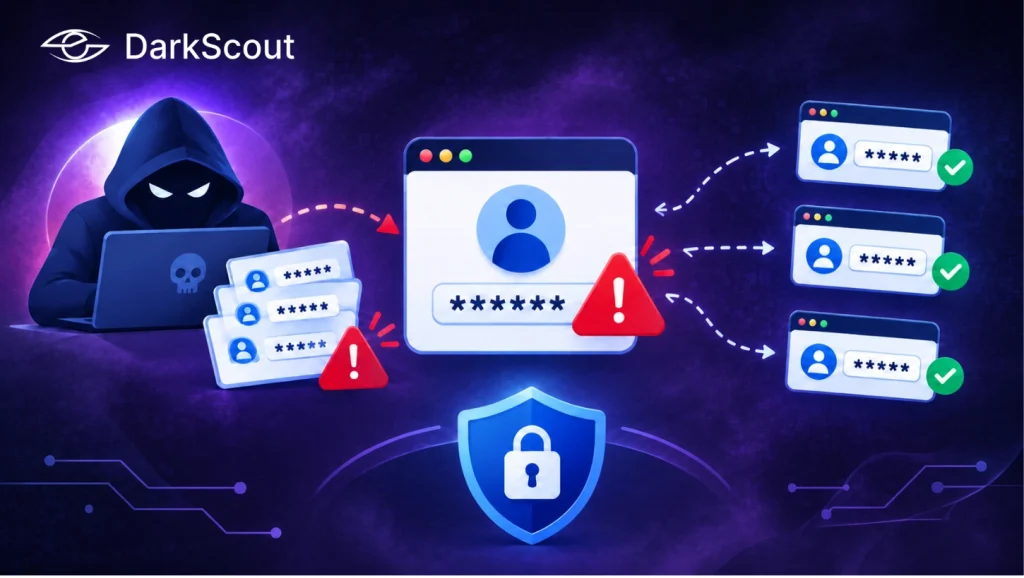
It starts with stolen credentials. A third-party website is breached, a database is leaked, or an employee’s device is infected with an infostealer, malware that collects saved logins and browser data. The stolen pairs then circulate in leak databases, underground forums, and combined lists that merge many breaches into one file.
Next, a bot or a person tests the credentials at scale against valuable targets such as email providers, single sign-on portals, VPNs, and SaaS tools. When a pair matches, the attacker signs in as the employee, often changes recovery options, sets up mailbox forwarding, or exports data, then uses the access or sells the working login to someone else.
Even a very low success rate pays off, because leaked lists hold huge numbers of pairs and automated testing costs almost nothing. The defender’s problem is that every failed attempt looks like ordinary noise, while the one that works looks like a normal login.
The account an attacker wants is often not the account that leaked.
Password Reuse Risks for a Business
Password reuse risks grow with the number of accounts a person holds and the value of the best one. For a business, that best account is rarely the one the employee was thinking about when they chose the password.
One Personal Account Can Become a Corporate Foothold
Imagine an accounts payable clerk who used the same password on a shopping site and on the company’s invoicing portal. When the shopping site is breached, the attacker ignores the shopping account, tries the login on common business portals, gets into the invoicing system, reads the vendor email threads, and sends a polite request to change a supplier’s bank details. The company’s defenses never saw a break-in, because the sign-in was valid. DarkScout’s account takeover prevention guide covers how to stop this pattern.
Password Reuse Risks for Shared, Service, and Admin Accounts
Password reuse risks climb where accounts carry more power or have more people behind them. The worst cases are administrator accounts, where a single reused password can expose every system the admin manages, and shared logins, where one person’s leaked habit exposes everyone who uses the account. Service and API accounts are another weak spot, since they are set once and never rotated, sometimes with a password copied from an older system. Executive and finance accounts get the most attention from attackers because access converts quickly into money or leverage.
A Real Case: 23andMe
According to Axios’s December 2023 reporting, fewer than 14,000 accounts were first compromised through credential stuffing. Because those accounts were linked to relatives through the company’s DNA Relatives feature, hackers accessed personal data on 6.9 million people, almost half of the company’s customers. 23andMe said it believed the attackers got in through a small number of customers who reused passwords exposed in breaches of other websites, then required all users to reset their passwords and said it would require two-factor authentication. The lesson is that the damage often reaches well beyond the accounts that were guessed: what the compromised accounts are connected to sets the real size of the incident.
How Common Are Password Reuse Attacks?
No single statistic captures reuse directly, because a successful attack looks like a normal login. Cloudflare’s data gives the closest picture. Analyzing traffic from September to November 2024 across about 30 million Internet properties on its free plan that use its leaked credentials detection, it reported in March 2025 that 41% of successful human logins involved leaked passwords, and that 95% of login attempts using leaked passwords came from bots, which points to credential stuffing.
Treat these figures with care. The Cloudflare number also counts owners signing in to their own accounts with a password that happens to be exposed, so it shows how many accounts sit one lucky attempt away from takeover, not how many were taken over. That is still the point: a leaked password in active use is a door attackers can find without any skill.
Signs Reused Credentials Are Being Used Against You
Reuse attacks leave faint traces, but the signals are worth building alerts around. Watch for a burst of failed logins across many accounts from the same IP ranges followed by a few successes, successful sign-ins from new countries, hosting providers, or devices, and multi-factor prompts employees did not trigger, which can mean an attacker already has the password and is waiting for approval. After a login, look for password resets, recovery email or phone changes, and new inbox forwarding rules, delegates, or connected apps. Employee email addresses or passwords showing up in an email breach check or in leak monitoring mean exposure has already happened.
Consider a help desk that receives five reports of unexpected MFA prompts within an hour. Each employee did the right thing by not approving the request, but the pattern shows that someone holds working passwords for at least five accounts. That is the moment to force resets and review sessions, before one person taps approve out of habit.
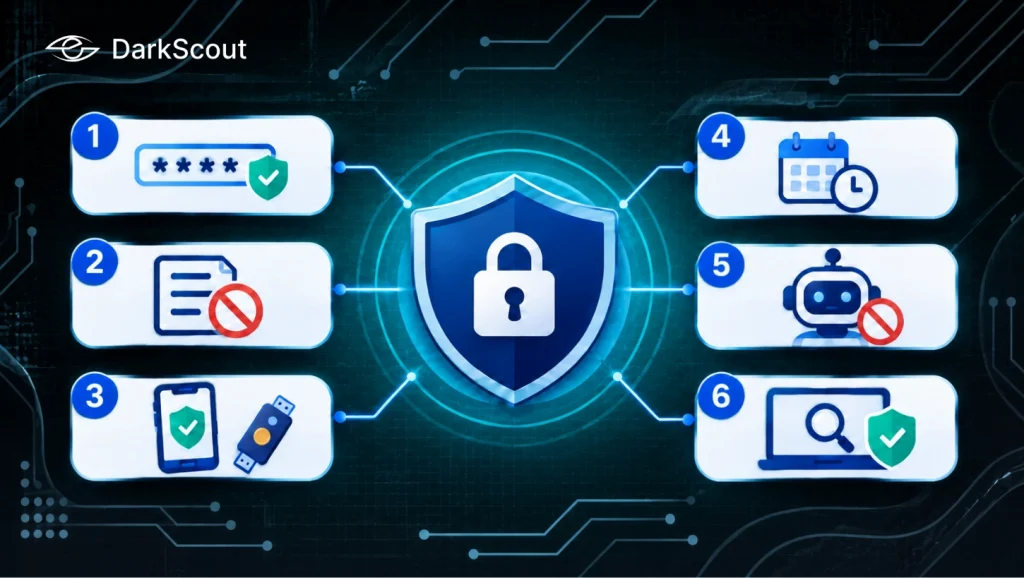
Credential Reuse Prevention: 6 Ways to Stop Password Reuse Attacks
Credential reuse prevention works best as layers, because each control covers a gap the others leave. These six are ordered from the foundation outward.
1. Give Every Account a Unique Password With a Password Manager
CISA defines a unique password as one used for only one account, and advises leaders to use long, random, unique passwords on all accounts. It also notes that an organization-wide password manager makes best practices easier to follow, since employees only need to remember one strong master password. Put shared logins into the manager too, so a shared credential has one owner and a change history. DarkScout’s free Password Generator can create a strong random password when you need one quickly.
2. Block Known-Leaked Passwords at Creation
NIST’s Digital Identity Guidelines (SP 800-63B) say verifiers must compare a new or changed password against a blocklist and reject matches, comparing the entire password rather than pieces of it. The blocklist can include passwords from previous breaches, dictionary words, and context-specific words such as the service name or username. The guidance also sets a minimum of 15 characters when a password is the only factor, allows eight when it is part of multi-factor authentication, and says not to impose composition rules such as mandatory symbols. Check which version your auditors reference, since requirements change between revisions.
3. Add Phishing-Resistant Multi-Factor Authentication
CISA says phishing-resistant MFA, especially forms that use an app or hardware token, adds a critical layer of security even if a password is stolen, and recommends starting with administrator and remote access accounts before extending to all users. Hardware security keys and passkeys are the usual options. Texted codes and approve-or-deny prompts are weaker because they can be intercepted or tapped by mistake.
4. Stop Forced Rotation and Rotate on Evidence
Routine password changes every 60 or 90 days invite small edits to an old password, which is reuse in slow motion. NIST says verifiers should not require periodic changes, but should force one when there is evidence the password has been compromised. That shifts the work from calendar-based rotation to detecting exposure, which is where the next two controls come in.
5. Slow Down the Bots
Because most leaked-password login attempts in Cloudflare’s data came from bots, controls on the login page matter. Rate limiting, bot management, and leaked-credential detection on sign-in forms make automated testing slower and noisier, and Cloudflare recommends all three for site owners. For internal systems, throttle repeated attempts and alert on bursts.
6. Monitor for Exposed Credentials Continuously
Rules at the login page cannot see a password that leaked last Tuesday from a site your company has never heard of. Monitoring can. DarkScout’s Credential Watch & Breach Detection monitors breached credentials and exposed logins and alerts you to compromised accounts, so you can force a reset before anyone tries the pair against your systems.
For a quick manual check, DarkScout’s free Exposed Password Checker tells you whether a specific password value appears in known breach datasets, without signup. DarkScout says the password is hashed in the browser and only a short hash prefix is sent for comparison, the same k-anonymity approach used by Have I Been Pwned’s Pwned Passwords. Whatever the method, decide as policy whether employees may type live corporate passwords into any external site.
Where Credential Reuse Prevention Still Leaves Gaps
Even a well-run program leaves some openings. Stolen sessions skip the password: infostealer malware can capture session cookies, which let an attacker resume an authenticated session without ever entering the password or the MFA code. Shadow IT sits outside the manager, because accounts created by teams on their own, outside single sign-on, are where reused passwords survive. Old exposures also stay valid, since a password leaked years ago works today if the account was never changed. And third-party breaches are invisible, because you may never be told that a vendor or consumer site lost your employees’ passwords. Inventory and monitoring matter as much as policy in credential reuse prevention, because a control only helps on accounts someone knows exist.
What to Do When You Find Reused or Exposed Credentials
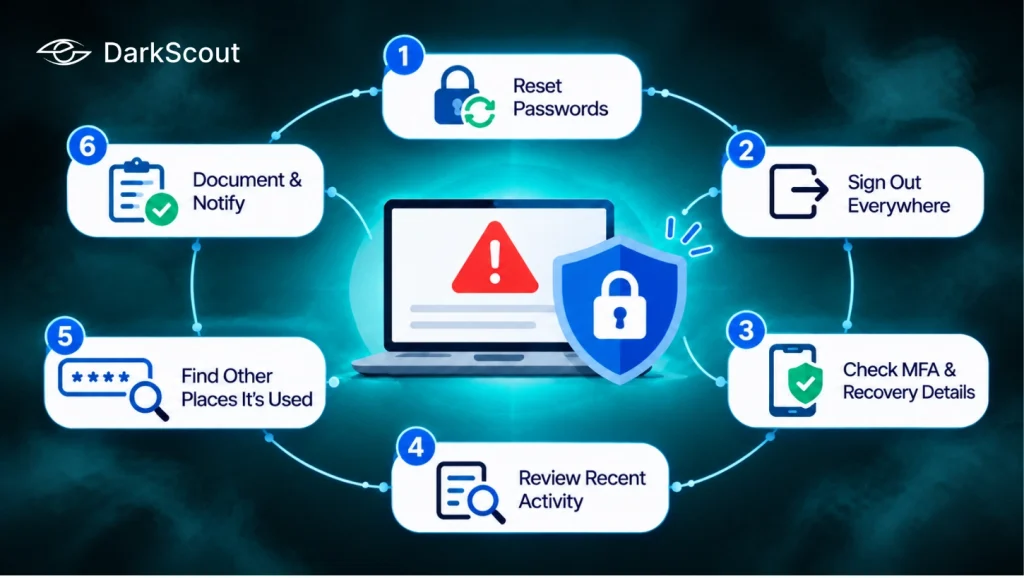
When a monitoring alert, a user report, or a breach check shows that a work password is exposed or reused, move through these steps in order:
- Reset the password on the affected account and on any other account that used the same one, confirming the request through a channel you trust.
- Sign the account out everywhere and revoke active sessions, tokens, app passwords, and connected app grants, since a password change alone may not end an attacker’s session.
- Check MFA methods, recovery details, mailbox rules, forwarding addresses, and delegates for anything added after the exposure date.
- Review what the account touched since then: files opened, data exported, payment or vendor details changed, new admin users created.
- Ask the employee where else the same password was used at work, including shared logins, and reset those too.
- Record the incident, tell the employee what happened without blame, and involve legal or compliance if customer or regulated data was accessed.
A small company can work through this list quickly if someone owns it in advance. Without an owner, the same reset can drift for days while the old session stays open. For the employee’s own accounts, DarkScout’s password breach guide explains what to do next.
Conclusion
A password reuse attack succeeds because one human habit meets a large supply of leaked logins. The attacker needs no special skill, the login looks legitimate, and the weak point is usually an account you do not manage. That is why the password reuse risks are mostly about reach: a forgotten sign-up on a personal site can end in a corporate mailbox, an invoicing portal, or a set of customer records like the ones 23andMe lost.
The credential reuse prevention steps here work together. Unique passwords and a manager remove the habit, a breach blocklist and phishing-resistant MFA make a leaked password far less useful, rate limiting slows the bots, and monitoring catches the exposures the other controls cannot see. Pair them with a written response plan so that someone knows who resets what, and in what order. If you want a continuous view of exposed employee logins, DarkScout’s Credential Watch & Breach Detection is built for that job, and the free tools are a low-effort place to start.