A modern SOC analyst can face up to 10,000 alerts in a single day. According to Microsoft and Omdia’s 2026 State of the SOC report, roughly 46 percent of those alerts turn out to be false positives, meaning nearly half of an analyst’s daily workload produces zero actual security value.
Buried somewhere inside that noise are the indicators that actually matter, the specific digital breadcrumbs confirming an attacker has already been inside a system. Learning to recognize, collect, and act on those breadcrumbs is what indicators of compromise, or IOCs, are built for.
This guide explains exactly what an IOC is, the different types security teams track, real examples of each, how IOCs get collected and used in practice, and the honest limitation that even security vendors are starting to admit openly: IOCs alone are no longer enough against how attackers actually operate in 2026.
What Is an Indicator of Compromise (IOC)?

An indicator of compromise is a piece of forensic evidence suggesting that a system, network, or account has already been breached. It functions like a digital fingerprint left behind after an attacker has been active somewhere in the environment.
IOCs are fundamentally reactive by nature. They confirm that something already happened rather than predicting that something is about to happen. A known-malicious file hash, an unusual login from a country your company has no presence in, or a spike in outbound traffic to an unfamiliar server are all IOCs, evidence collected after the fact that helps security teams confirm a breach occurred, scope how far it spread, and hunt for related activity elsewhere in the environment.
Why IOCs Matter
IOCs are the foundation that most detection and incident response work is built on, even with their reactive limitations.
They shorten detection time
They shorten the distance between a breach happening and a security team actually finding out about it. Without a library of known IOCs to match against, a security team is left trying to manually spot anomalies with no reference point at all. Our broader guide to cyber threat intelligence covers how IOCs fit into the larger intelligence discipline built around understanding and countering active threats.
They turn one incident into lasting protection
IOCs also give defenders a way to learn from an attack after it happens. Recurring IOCs tied to the same actor or campaign reveal patterns in tooling and technique that can be built directly into future detection rules, turning a single incident into lasting protection against the same attacker trying again.
Types of IOCs
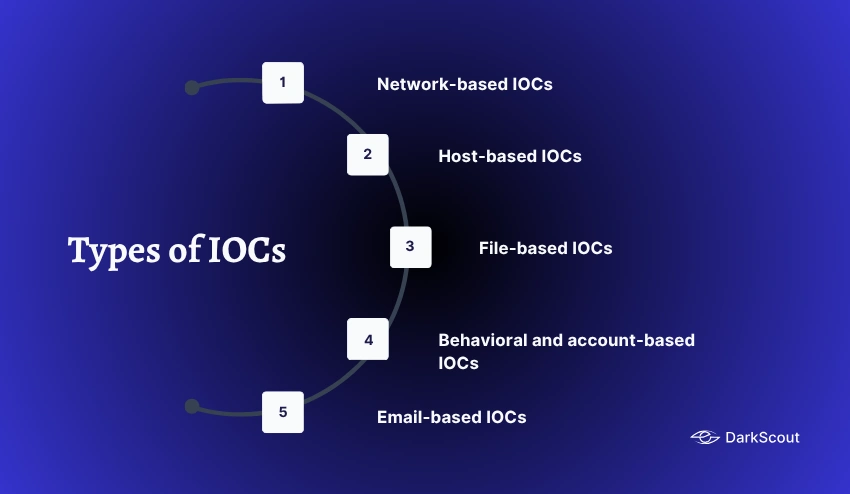
IOCs get grouped into a few broad categories depending on where the evidence actually shows up.
1. Network-based IOCs
An example of host-based indicators of compromise we might see on the network. The compromise indicator is highly suspicious traffic, large outbound data flow or unknown encrypted traffic to an unknown destination. This occurs at the first sign of compromise from the threat actor because a network perimeter threat indicator may detect the attack early on before the attacker can move deep within the system.
2. Host-based IOCs
Indicators on an endpoint is evidence with a specific device or endpoint. E.g. Unexpected file modification, new registry entries, unrecognised application installed or system configuration has been changed. Indicators of this sort usually need endpoint detection tools to come up on.
3. File-based IOCs
Malicious file hashes, known malware signatures, and suspicious file names or extensions. A file hash acts as a unique fingerprint for a specific file, letting a security tool flag a known-malicious file the instant it appears anywhere in the environment, even before it runs.
4. Behavioral and account-based IOCs
Unusual account activity such as logins at abnormal hours, privilege escalation attempts, or a sudden spike in failed login attempts consistent with a brute force or credential stuffing attack. Compromised credentials frequently surface first as this type of IOC, well before any broader system compromise becomes visible elsewhere. Our explainer on what a stealer log actually contains covers exactly how stolen credentials feed into this category of indicator.
5. Email-based IOCs
Malicious sender domains, spoofed lookalike addresses, and known phishing infrastructure. Since so many intrusions start with a phishing email, this category often provides the earliest possible IOC in an entire attack chain.
Common Examples of IOCs
Beyond the broad categories above, these are the specific signals security teams look for most often day to day.
- Unusual outbound network traffic, especially large volumes moving to an unfamiliar or high-risk destination.
- Geographic anomalies: access or traffic from a country in which an organization has no legal business.
- Odd activities performed on privileged accounts, like alteration of permissions in ways not expected, or administrators accessing locations they usually shouldn’t.
- Huge increase in number of Failed Logins… probably applying a brute-force attack or a form of credential-stuffing attack.
- Untimed alteration of an endpoint system or registry file. An endpoint that was scheduled at a time didn’t show any change or maintenance was down.
- Multiple hits on a file, at a level associated with data exfiltration.
- Known malicious file hashes or IPs associated with current threat intelligence feeds.
- Mismatched port-application traffic, consisting of an application speaking on a port where it never should.
How Security Teams Collect and Use IOCs
Turning a raw IOC into an actual defensive action follows a fairly consistent process across most security teams.
- Collection. IOCs come from threat intelligence feeds, internal security logs, EDR and SIEM alerts, and increasingly from dark web monitoring sources that catch compromised credentials before they get used. Our guide to threat intelligence feeds covers where this raw data typically originates.
- Aggregation. Single IOCs are aggregated together, generally in a threat intelligence platform. Here they can be cross-referenced and examined for duplicates rather than looked at independently in separate systems.
- Matching and correlation. The set of aggregated IOCs should be checked against actual network traffic, endpoint behavior, and account activity. A match identified should trigger an investigation.
- Investigation and threat hunting. Analysts use confirmed IOCs as a starting point to hunt for related, still-undetected activity elsewhere in the environment. Our guide to threat hunting covers how this proactive search process works in practice.
- Response and containment. Validated IOCs get pushed into firewalls, EDR tools, and network intrusion detection systems to block known malicious activity automatically. Our overview of network intrusion detection covers how this enforcement layer actually operates.
- Documentation. Confirmed IOCs get logged as part of the incident record, both for compliance purposes and to build institutional knowledge about how that specific attacker or campaign operates. Our incident response guide covers this documentation step in more depth.
IOC vs IOA, Briefly
IOCs and indicators of attack, or IOAs, get confused constantly, and the short version is worth covering here even though it deserves its own deeper explanation.
An IOC is evidence that an attack already happened. It is historical by definition: a file hash or a malicious IP confirming something occurred in the past. An IOA instead focuses on behavior and intent while an attack is still unfolding, giving defenders a chance to intervene before the damage is done rather than after.
Neither one replaces the other. Strong security programs use both together: IOCs to confirm and investigate what has already occurred, and IOAs to catch what is happening right now. Our full breakdown of IOC vs IOA covers this distinction in complete depth, including why relying on IOCs alone leaves a real gap in detection timing.
Why IOCs Alone Are No Longer Enough
Honest limitations matter here, since IOCs remain useful but increasingly insufficient on their own against how modern attackers actually operate.
Attackers have shifted heavily toward stolen credentials and living-off-the-land techniques, using legitimate system tools and valid logins rather than obvious malware that would generate a clean, matchable IOC. When an attacker logs in with a real, stolen password and uses built-in administrative tools already present on a system, there is often no malicious file hash or suspicious IP address to catch at all.
IOCs are also inherently reactive and short-lived. A malicious IP address can rotate within hours, and by the time an IOC gets published in a threat feed, sophisticated attackers have frequently already moved on to new infrastructure. This is exactly why security teams increasingly pair IOC-based detection with behavioral analysis, IOAs, and continuous credential exposure monitoring rather than relying on static indicator matching alone. Our roundup of AI threat intelligence tools covers how modern platforms are adapting to close exactly this gap.
Best Practices for Using IOCs Effectively
A few practical habits separate teams that get real value from their IOC data from those drowning in it.
- Prioritize by context, not volume alone. Not every IOC deserves equal urgency. Weigh an indicator against your specific environment and assets before treating it as critical.
- Keep feeds current and prune stale entries. An outdated IOC list wastes analyst time chasing infrastructure attackers abandoned long ago.
- Correlate across sources rather than treating each feed in isolation. The same indicator appearing in multiple independent sources carries far more weight than a single unconfirmed report.
- Pair IOCs with behavioral detection. Since IOCs alone increasingly miss credential-based and living-off-the-land attacks, layering in IOA-based and behavioral detection closes a real gap.
- Monitor for credential exposure continuously. Compromised credentials often surface on the dark web well before they generate any other detectable IOC, making early exposure monitoring one of the highest value additions to a standard IOC program.
Conclusion
Indicators of compromise remain a foundational part of how security teams detect, confirm, and investigate breaches. Understanding the different types, from network and host-based signals to file hashes and behavioral anomalies, gives any security program the vocabulary and structure needed to actually act on the data flooding in every day.
But the honest picture in 2026 is that IOCs alone are increasingly playing catch-up against attackers who rely on stolen credentials and legitimate tools rather than obvious malware. Closing that gap means pairing traditional IOC matching with behavioral detection and continuous monitoring for the exposure that leads to a breach in the first place.
If your organization wants to catch compromised credentials before they turn into the kind of IOC a SIEM eventually flags, DarkScout’s email exposure scanner checks whether your addresses already appear in known breach and stealer log data.
Frequently Asked Questions
An indicator of compromise (IOC) is a piece of forensic evidence that suggests a system, network, or account has been compromised. Examples include malicious IP addresses, file hashes, suspicious logins, and unusual network activity.