A SOC analyst opens their shift to 40,000 unread indicators. Most are noise. A handful are the early warning of an attack already in motion.
By the time that analyst manually sorts through the queue, the window to act has usually closed. According to CrowdStrike’s 2026 Global Threat Report, the average time between initial access and an attacker’s first lateral move fell to just 29 minutes in 2025, a jump in speed of roughly 65 percent from the year before. Some intrusions moved from access to data theft in under four minutes.
That is the gap a threat intelligence platform exists to close. Not by adding another dashboard, but by turning a flood of disconnected data into something a team can act on before the window shuts.
Most explanations of what a TIP does stop at the vendor pitch. This guide goes further. It covers how a TIP actually processes data, where it overlaps with a SIEM or SOAR and where it does not, what a modern AI-driven platform adds in 2026, and the part vendor pages consistently leave out: the blind spot almost every TIP has when it comes to the dark web, and what that gap actually costs.
What a Threat Intelligence Platform Actually Is
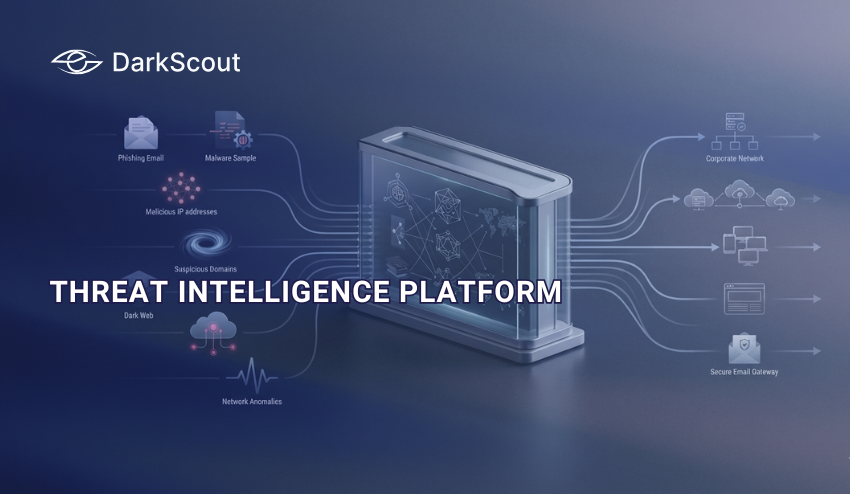
A threat intelligence platform is software that collects threat data from multiple sources, correlates it, and turns it into something a security team can act on. It replaces the manual work of pulling feeds, spreadsheets, and reports together by hand.
The output matters more than the input. Raw data about a suspicious IP address or a new malware hash is not intelligence on its own. It becomes intelligence once a platform adds context: who is behind it, what industries it targets, and whether it is actually relevant to your environment. This distinction is the foundation of what we cover in our broader guide to cyber threat intelligence, which walks through the discipline that a TIP is built to support.
Most platforms today ship as SaaS, which is faster to deploy and easier to keep current than the on-premises TIPs common a decade ago. The underlying job has not changed, though. A TIP exists to save analysts from drowning in data they do not have time to sort by hand.
How a TIP Processes Data, Step by Step
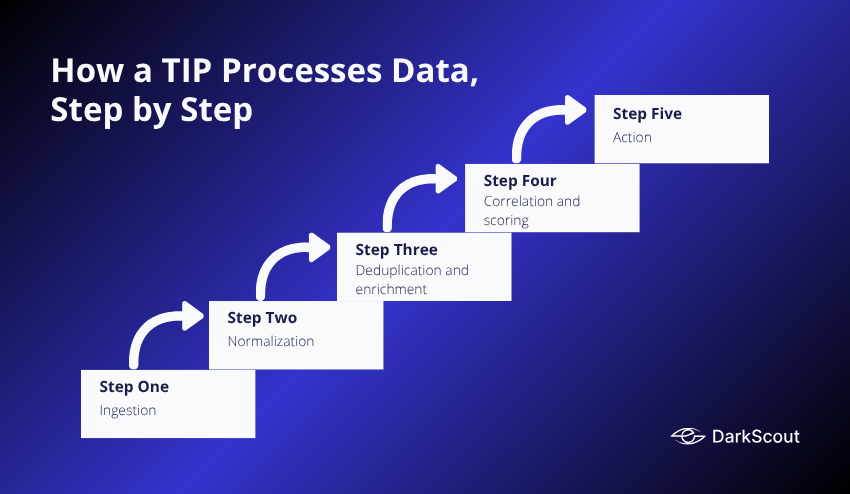
A TIP is not one tool doing one job. It is a pipeline, and each stage solves a different problem.
Step 1: Ingestion
Data comes in from open source feeds, commercial feeds, government sources like CISA, internal logs, and increasingly dark web sources. The goal at this stage is coverage, not quality control yet.
Step 2: Normalization
Inconsistent data gets put into a common format. A malware hash from one feed and a phishing domain from another need to speak the same language before a platform can compare them.
Step 3: Deduplication and enrichment
The same indicator often shows up across a dozen feeds. A good TIP collapses duplicates and adds context such as geolocation, reputation scoring, and known malware family associations, so an analyst sees one enriched record instead of ten stripped-down ones.
Step 4: Correlation and scoring
Not every indicator deserves the same attention. This stage ranks what actually matters, and a platform that cannot prioritize just moves the noise problem downstream to the analyst.
Step 5: Action
Intelligence that stays in a dashboard does nothing. A mature TIP pushes validated indicators into a SIEM, a firewall, or an EDR tool automatically, so a confirmed malicious IP gets blocked without a human copying and pasting it somewhere.
This full sequence is what we break down in detail in our guide to the threat intelligence lifecycle.
TIP vs SIEM vs SOAR: Where the Lines Actually Are
These three tools get lumped together constantly, and the overlap is real, but each one answers a different question.
SIEM: What happened
A SIEM collects and correlates logs from across your infrastructure and raises alerts when something looks abnormal. It is built for visibility and compliance reporting, not for deciding what to do next.
SOAR: What do we do about it
A SOAR automates the response, running playbooks that can isolate a device, disable an account, or escalate a ticket without a human doing each step manually.
TIP: Should we care
A TIP sits upstream of both, feeding context into the SIEM so alerts get prioritized correctly, and feeding validated indicators into the SOAR so automated responses act on intelligence instead of guesswork. A SIEM without threat intelligence sees an anomaly. A SIEM with threat intelligence sees an anomaly tied to a known threat actor’s infrastructure, which is a very different alert to wake someone up for at 2 am.
Many vendors bundle all three into one console today. That does not eliminate the distinction; it just means the functions live under one roof instead of three separate tools.
A TIP Is Not the Same as a Threat Feed
This is the confusion that causes the most wasted budget. A feed is an input. A platform is what does something with that input.
A threat feed is a raw stream of indicators such as malicious IPs, domains, or file hashes. Subscribing to feeds gives you volume, but volume without context is close to useless. An IP flagged as malicious tells you nothing about whether it is relevant to your infrastructure or how urgently it should be handled.
A TIP takes feeds as one input among several, then does the work of deduplicating, scoring, and contextualizing them so an analyst is not manually cross-referencing forty spreadsheets during an incident. Our full breakdown of how threat intelligence feeds work, and where they fall short on their own, covers this distinction in more depth.
Buying more feeds without a platform to process them usually makes the noise problem worse, not better.
The Types of Threat Intelligence a TIP Handles
A mature TIP operates across several distinct layers of intelligence, and most platforms are noticeably stronger at some than others. Each layer answers a different question, serves a different audience, and has a different shelf life before it goes stale.
1. Strategic intelligence
This is the highest level layer, built for executives, boards, and risk owners rather than analysts. It answers questions like which threat actors are actively targeting your industry, how the regulatory landscape is shifting, and what trends should shape next year’s security budget.
Sources here tend to be annual threat reports, geopolitical analysis, and sector-specific risk trends rather than raw indicators. A retail company learning that a major ransomware group has pivoted toward retail targets is strategic intelligence. It shapes budget and insurance decisions, not a firewall rule, and it stays relevant for months or quarters rather than hours.
2. Tactical intelligence
Tactical intelligence covers the tactics, techniques, and procedures, commonly called TTPs, that attackers actually use. Most platforms map this directly to the MITRE ATT&CK framework, giving SOC teams and detection engineers a shared vocabulary for what an attacker’s behavior looks like.
This is the layer that turns into actual detection rules. Learning that an actor group favors living-off-the-land binaries to avoid antivirus detection lets a detection engineer build a rule for that specific behavior, rather than waiting to react to whatever indicator shows up first. Tactical intelligence has a longer shelf life than a specific IP address because attacker behavior patterns change far more slowly than their infrastructure does.
3. Operational intelligence
Operational intelligence is campaign-specific. It focuses on a particular incoming attack, a specific piece of active infrastructure, or a threat actor’s current targeting, often surfaced through real-time monitoring of forums, marketplaces, and leaked planning chatter.
This layer is consumed most directly by incident responders and threat hunters actively working a case. It has a short shelf life since a campaign’s infrastructure and tactics shift the moment defenders start blocking it, but it is often the layer that gives an organization actual advance warning before an attack lands, rather than confirmation after the fact.
4. Technical intelligence
Technical intelligence is the most granular layer, made up of the actual machine-readable indicators such as file hashes, malicious IPs, and phishing domains that feed directly into a SIEM, firewall, or EDR block list.
It is also the layer with the shortest shelf life by far. A malicious IP can rotate within hours as attackers move between compromised hosts, which is why technical intelligence alone, without the context the other three layers provide, ages out of usefulness the fastest and needs constant refreshing to stay accurate.
Our complete guide to the types of threat intelligence covers each layer in far more depth than fits here, including how they feed into each other and how to weight them for different team sizes.
A platform that only handles technical intelligence looks impressive on a dashboard, with a high volume of indicators streaming in constantly, but leaves the strategic and tactical layers, the ones that actually shape defensive planning rather than just reacting to it, completely uncovered.
IOCs and IOAs Inside a TIP
Every TIP works with indicators, but not all indicators are the same kind of signal, and mixing them up leads to weaker detection.
An indicator of compromise, or IOC, is evidence that an attack has already happened. A known-bad file hash or a malicious IP address is an IOC. They are useful for confirming a breach and hunting for related activity, but by definition, they are historical.
An indicator of attack, or IOA, focuses on behavior and intent rather than a static artifact. It flags what an attacker is trying to do, like an unusual privilege escalation attempt, while the attack is still unfolding. This is what gives defenders a chance to intervene before the CrowdStrike-reported 29-minute breakout window closes rather than after.
A platform leaning entirely on IOCs is playing catch-up by design. Our detailed comparison of IOC vs IOA walks through exactly how each one changes the detection strategy and why the strongest TIPs use both together.
Types of Threat Intelligence Data
IOCs and IOAs describe how an indicator functions. The categories below describe what the indicator actually is. A TIP worth using pulls in most or all of these, since relying on just one or two categories leaves obvious gaps in coverage.
1. Network indicators
Malicious IP addresses, domains, and URLs tied to command-and-control servers, phishing sites, or known bad hosting infrastructure. This is the most common data type and also the one that ages fastest, since attackers rotate infrastructure constantly to stay ahead of blocklists.
2. File-based indicators
File hashes, malware signatures, and behavioral patterns tied to specific malware families. These let a TIP flag a file as malicious the moment it appears anywhere in an environment, even before it executes.
3. Vulnerability intelligence
CVE data enriched with exploitation context, such as whether a vulnerability is being actively exploited in the wild rather than just theoretically patchable. This layer is what separates a patch schedule based on severity score alone from one based on real attacker behavior.
4. Threat actor and campaign profiles
Named adversary groups, their known TTPs, historical targeting patterns, and the infrastructure tied to specific campaigns. This is the data that lets an alert get attributed to a known group instead of showing up as an anonymous event.
5. Identity and credential data
Leaked credentials, session tokens, and account details surfaced from breach dumps and dark web marketplaces. This category is where most TIPs are weakest, since it requires active darknet monitoring rather than passive feed subscriptions, and it is often the earliest signal available before an attack ever reaches the network.
6. Email and phishing indicators
Malicious sender domains, spoofed lookalike domains, and known phishing kit signatures. Given how often initial access starts with a phishing email, this category feeds directly into email security tooling rather than sitting purely in a SOC dashboard.
A platform that only covers network and file-based indicators is really just running a glorified blocklist. The categories that involve context, like actor profiles and credential exposure, are what actually turn a stream of data into intelligence a team can act on before an incident starts.
Core Features to Look For

Feature lists across vendor pages tend to blur together. These are the capabilities that actually separate a platform that reduces analyst workload from one that just adds another tab to check.
- Multi-source aggregation. Open source, commercial, government, and dark web sources combined into one pipeline, not a dozen disconnected tools.
- Automated enrichment and scoring. Context and priority are added automatically, not left for an analyst to research indicator by indicator.
- Deduplication. The same threat reported by five feeds should show up once, not five times.
- Native integrations. Direct connections to SIEM, SOAR, EDR, and firewalls so validated intelligence can act automatically instead of sitting in a report.
- Threat actor and campaign tracking. Named adversary profiles and TTP mapping, not just a stream of anonymous indicators.
- Collaborative sharing. The ability to share intelligence across teams, ISACs, or trusted communities rather than keeping it siloed.
- Coverage beyond the surface web. Visibility into darknet forums, marketplaces, and stealer log activity, which is where a large share of pre-attack signals actually originate.
That last point is worth its own section, because it is where most platforms quietly fall short.
What AI Actually Changed in 2026
AI has become the standard framing for every vendor pitch this year, but the practical shift is narrower than the marketing suggests, and it cuts in both directions.
On the defensive side, AI has meaningfully improved a TIP’s ability to process unstructured intelligence. Natural language processing lets analysts query threat data conversationally instead of writing complex search syntax, and machine learning models can surface patterns across millions of indicators that a human team would never manually correlate. Our roundup of the best AI threat intelligence tools covers which platforms are actually delivering on this versus which ones are AI in name only.
On the offensive side, the same acceleration is working against defenders. CrowdStrike’s 2026 report found AI-enabled adversary activity rose roughly 89 percent year over year, with attackers using AI to automate reconnaissance, generate phishing content, and accelerate credential theft. Faster attacker tooling is a big part of why breakout time compressed so sharply. A TIP that has not adapted its correlation speed to match is falling further behind every quarter, not just standing still.
The honest takeaway is that AI has raised the ceiling on what a TIP can process, but it has also raised the floor on how fast a platform needs to move just to keep pace.
What a Threat Intelligence Platform Cannot Do
Vendor pages rarely admit this, but a TIP has real limits, and understanding them prevents teams from treating it as a complete security program on its own.
- A TIP cannot replace a human analyst’s judgment. It prioritizes and contextualizes data, but deciding how to respond to a genuinely novel threat still requires someone who understands your specific environment and risk tolerance.
- A TIP is only as good as the sources feeding it. A platform pulling from thin or stale feeds will produce confident-looking but incomplete intelligence, which is arguably more dangerous than no intelligence at all because it creates false confidence.
- A TIP does not stop an attack by itself. It informs the tools that do, like a SIEM, a SOAR, or an EDR platform. Without those integrations actually wired up and tuned, intelligence just sits in a dashboard nobody has time to read during an active incident.
- A TIP cannot fix a team that has no process for acting on what it surfaces. Buying a platform without building a workflow around it is a common way organizations spend budget without reducing risk.
Building a Threat Intelligence Program Around a TIP
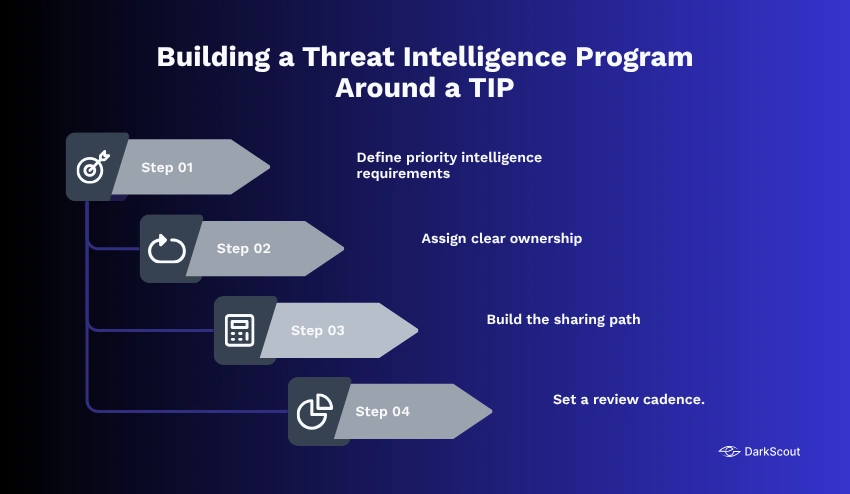
A platform is the engine, not the whole program. Teams that get real value from a TIP treat it as one component inside a broader intelligence function rather than a standalone purchase. That usually comes down to a few concrete steps.
- Define priority intelligence requirements. Decide the specific questions your organization actually needs answered, such as which threat actors target your sector or which of your assets are most exposed, so the platform is not just ingesting everything indiscriminately.
- Assign clear ownership. Someone needs to own triage, someone needs to own response workflows, and it needs to be documented rather than assumed. Without this, alerts sit unclaimed even when the platform surfaces them correctly.
- Build the sharing path. Decide how intelligence moves from analyst to security team to IT to leadership, so a strategic finding actually reaches the people who set the budget, and a technical indicator actually reaches the people who can block it.
- Set a review cadence. Requirements and priorities drift as the threat landscape and the business change. A program with no scheduled review quietly goes stale within a few months.
Our step-by-step guide on how to build a threat intelligence program covers this process in full, including how smaller teams without a dedicated intel analyst can still run a functional program using a well-configured platform.
Skipping this step is the single most common reason organizations end up with an expensive tool and no measurable reduction in incident response time.
How to Evaluate a TIP Before You Buy
Vendor demos are designed to look impressive. A short evaluation checklist cuts through that faster than a sales call will.
- How many sources feed the platform natively, and specifically, whether dark web and stealer log data are included by default or sold as a separate add-on.
- How enrichment and scoring actually work. A platform that just aggregates feeds without context is closer to an expensive RSS reader than real intelligence.
- Which SIEM, SOAR, and EDR tools it integrate with natively? A TIP that cannot push validated indicators automatically creates manual work rather than removing it.
- What the platform does not cover. A vendor willing to name their own limitations is usually more trustworthy than one who claims to do everything.
Conclusion
A threat intelligence platform is not a dashboard full of indicators. It is the layer that decides which of those indicators actually deserve your team’s attention, and gets that answer to the tools that can act on it before an attacker’s window closes.
The gap between a good TIP and a mediocre one shows up exactly when it matters most, in the minutes between initial access and lateral movement that CrowdStrike’s 2026 data shows shrinking every year. A platform still limited to surface web feeds is only ever working from the point an attack becomes visible, not the point at which the access behind it was acquired.
That is the part most platforms still get wrong. Credential exposure and stolen access routinely surface on the dark web long before they turn into an active intrusion anywhere else. DarkScout was built to close that specific gap, treating darknet monitoring as a core intelligence source rather than an afterthought.
If you want to see what your organization’s exposure actually looks like right now, DarkScout’s darknet threat assessment gives you a clear picture of what is already circulating before it becomes a breach report.